Deploy on K8s with ArgoCD
To set up an automated deployment workflow, a Kubernetes cluster is first established using Kind, containing both a control plane and a worker node. Next, ArgoCD is installed via Helm inside a designated namespace to oversee the GitOps synchronization process. An application container is then built using a Python Streamlit image, tested locally, and pushed to Docker Hub for remote accessibility. Following this, an ArgoCD Application resource is configured to link the cluster with a GitHub repository containing the deployment manifests. Finally, the application is successfully synchronized and deployed onto the cluster, where port-forwarding and cluster management commands are utilised to verify its health and operational status.
Preperation
bash: cd: ../kind/ex1: No such file or directory
Kube cluster has been created in the Kind using the following configuration (kind-config.yaml):
# kind-config.yaml
kind: Cluster
apiVersion: kind.x-k8s.io/v1alpha4
name: argocd-ex1
nodes:
  - role: control-plane
  - role: worker
Create a cluster:
kind create cluster --config kind-config.yaml
Creating cluster "argocd-ex1" ...
 ✓ Ensuring node image (kindest/node:v1.37.0) 🖼️
 ✓ Preparing nodes 📦 📦 7l
 ✓ Writing configuration 📜7l
 ✓ Starting control-plane 🕹️7l
 ✓ Installing CNI 🔌7l
 ✓ Installing StorageClass 💾7l
 ✓ Joining worker nodes 🚜7l
Set kubectl context to "kind-argocd-ex1"
You can now use your cluster with:

kubectl cluster-info --context kind-argocd-ex1

Not sure what to do next? 😅  Check out https://kind.sigs.k8s.io/docs/user/quick-start/
The cluster-info prints the API server address and the addresses of Services labelled kubernetes.io/cluster-service=true. The --context kind-argocd-ex1 selects the kubeconfig context for this invocation.
By kind’s naming convention, kind-argocd-ex1 corresponds to a cluster named
argocd-ex1. The flag overrides your default context for this command only.
kubectl cluster-info --context kind-argocd-ex1
Kubernetes control plane is running at https://127.0.0.1:35911
CoreDNS is running at https://127.0.0.1:35911/api/v1/namespaces/kube-system/services/kube-dns:dns/proxy

To further debug and diagnose cluster problems, use 'kubectl cluster-info dump'.
kubectl get nodes
NAME                       STATUS   ROLES           AGE     VERSION
argocd-ex1-control-plane   Ready    control-plane   2m39s   v1.37.0
argocd-ex1-worker          Ready    <none>          2m25s   v1.37.0
Install ArgoCD
Using Helm in the argocd namespace:
kubectl create namespace argocd
namespace/argocd created
The NAME and ROLES identify the two nodes:
argocd-ex1-control-planeruns the components that manage the cluster.argocd-ex1-workerruns workloads.
The worker shows
because it has no explicit Kubernetes node-role label.
Kubernetes reported both nodes as healthy and ready.
kubectl get namespace
NAME                 STATUS   AGE
argocd               Active   30s
default              Active   9m13s
kube-node-lease      Active   9m13s
kube-public          Active   9m13s
kube-system          Active   9m14s
local-path-storage   Active   9m10s
The selected command installs ArgoCD as a Helm release named argocd in the Kubernetes namespace argocd. It pins the argo/argo-cd chart to version 10.3.2 and sets a 10-minute timeout for individual Kubernetes operations that Helm waits on during installation. The saved output shows that Helm marked the first revision as deployed and printed instructions for accessing the ArgoCD web UI and signing in as admin1.
helm install argocd argo/argo-cd \
    --namespace argocd \
    --version 10.3.2 \
    --timeout 10m
NAME: argocd
LAST DEPLOYED: Fri Nov 27 09:51:11 2026
NAMESPACE: argocd
STATUS: deployed
REVISION: 1
TEST SUITE: None
NOTES:
In order to access the server UI you have the following options:

1. kubectl port-forward service/argocd-server -n argocd 8080:443

    and then open the browser on http://localhost:8080 and accept the certificate

2. enable ingress in the values file `server.ingress.enabled` and either
      - Add the annotation for ssl passthrough: https://argo-cd.readthedocs.io/en/stable/operator-manual/ingress/#option-1-ssl-passthrough
      - Set the `configs.params."server.insecure"` in the values file and terminate SSL at your ingress: https://argo-cd.readthedocs.io/en/stable/operator-manual/ingress/#option-2-multiple-ingress-objects-and-hosts


After reaching the UI the first time you can login with username: admin and the random password generated during the installation. You can find the password by running:

kubectl -n argocd get secret argocd-initial-admin-secret -o jsonpath="{.data.password}" | base64 -d

(You should delete the initial secret afterwards as suggested by the Getting Started Guide: https://argo-cd.readthedocs.io/en/stable/getting_started/#4-login-using-the-cli)
kubectl get pods -n argocd
NAME                                                READY   STATUS    RESTARTS   AGE
argocd-application-controller-0                     1/1     Running   0          9m55s
argocd-applicationset-controller-5cd5d47f9d-4cjf8   1/1     Running   0          9m55s
argocd-dex-server-fdcbfd75b-8cjgg                   1/1     Running   0          9m55s
argocd-notifications-controller-7689b76f58-x7gbw    1/1     Running   0          9m55s
argocd-redis-d67db4f48-6xk94                        1/1     Running   0          9m55s
argocd-repo-server-79bfcf97cd-8559m                 1/1     Running   0          9m55s
argocd-server-f5cf659b-np5rl                        1/1     Running   0          9m55s
After installing ArgoCD with Helm, we ran kubectl get pods -n argocd to check that its components had started. All seven pods were Running, each with 1/1 containers ready and zero restarts. This confirms that the ArgoCD components, including the server that provides the web UI, were ready when we checked.
Let’s do port forwarding:
nohup kubectl port-forward service/argocd-server \
    -n argocd 8080:443 > /tmp/argocd-port-forward.log 2>&1 &

echo $! > /tmp/argocd-port-forward.pid
[1] 52924
To access the ArgoCD web UI locally, we use kubectl port-forward to map local port 8080 to port 443 on the argocd-server Service in the argocd namespace. The & runs the command in the background, and nohup lets it ignore terminal hangup signals. The shell sends both standard output and standard error to /tmp/argocd-port-forward.log. The second line saves the background process ID ($!) in /tmp/argocd-port-forward.pid so we can stop it later.
The output [1] 52924 is the shell’s job notification. [1] is the job number and 52924 is the process ID for this run. A Forwarding from ... line in the log confirms that kubectl started listening locally. Once the forward is active, the web UI is available at https://localhost:8080.
!cat /tmp/argocd-port-forward.log
cat kind-config.yaml /tmp/argocd-port-forward.log /tmp/argocd-port-forward.log /tmp/argocd-port-forward.log /tmp/argocd-port-forward.log
# kind-config.yaml
kind: Cluster
apiVersion: kind.x-k8s.io/v1alpha4
name: argocd-ex1
nodes:
  - role: control-plane
  - role: workernohup: ignoring input
nohup: ignoring input
nohup: ignoring input
nohup: ignoring input
To stop the port forwarding:
kill $(cat /tmp/argocd-port-forward.pid)
To stop the background port forward, $(cat /tmp/argocd-port-forward.pid) reads the process ID saved when we started it. The shell passes that ID to kill, which sends SIGTERM by default. When the kubectl port-forward process exits, it closes the listener on local port 8080. The cell shows no output, which is normal when kill successfully sends the signal.
Get the password for the ArgoCD (username: admin):
ARGOCD_PASSWORD=$(kubectl -n argocd get secret argocd-initial-admin-secret -o jsonpath="{.data.password}" | base64 -d)
echo $ARGOCD_PASSWORD
KMghLyzb6zJmgAuT
Use the above password to login to the http://localhost:8080 with the username admin.
Connect via ArgoCD CLI:
argocd login localhost:8080 \
    --username admin \
    --password $ARGOCD_PASSWORD \
    --insecure
'admin:login' logged in successfully
Context 'localhost:8080' updated
check the ArgoCD CLI
argocd cluster list
SERVER                          NAME        VERSION  STATUS   MESSAGE                                                  PROJECT
https://kubernetes.default.svc  in-cluster  1.37.0   Unknown  Cluster has no applications and is not being monitored.
Applications
I’ve created 2 repositories in the GitHub:
ArgoCD application resource file (ex1.yaml):
apiVersion: argoproj.io/v1alpha1
kind: Application
metadata:
  name: ex1
  namespace: argocd
spec:
  project: default
  source:
    repoURL: https://github.com/ojitha/example-1-gitops.git
    targetRevision: main
    path: k8s/plain-manifests
    directory:
      recurse: true          # Pick up every service folder under this path
  destination:
    server: https://kubernetes.default.svc   # "This same cluster" — ArgoCD's own cluster
    namespace: ex1        # Namespace to deploy into
  syncPolicy:
    syncOptions:
      - CreateNamespace=true # Let ArgoCD create the namespace if it doesn't exist
Appy this to the cluster
kubectl apply -f ex1.yaml
application.argoproj.io/ex1 created
Confirm via ArgoCD
argocd app get ex1
Name:               argocd/ex1
Project:            default
Server:             https://kubernetes.default.svc
Namespace:          ex1
URL:                https://argocd.example.com/applications/ex1
Source:
- Repo:             https://github.com/ojitha/example-1-gitops.git
  Target:           main
  Path:             k8s/plain-manifests
SyncWindow:         Sync Allowed
Sync Policy:        Manual
Sync Status:        Synced to main (fa89283)
Health Status:      Healthy
kubectl get pods -n ex1
No resources found in ex1 namespace.
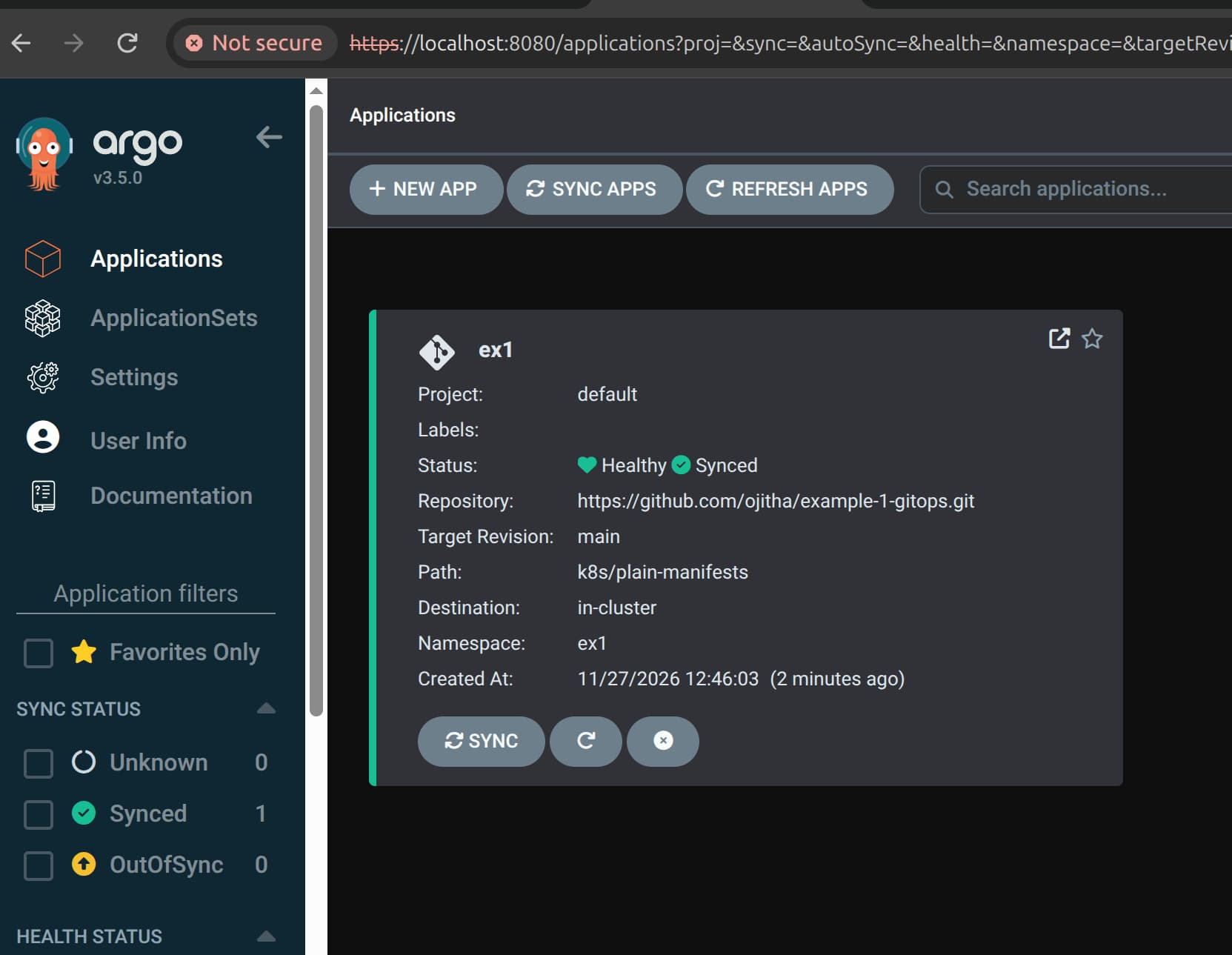
In the ArgoCD dasthoboard:
Dockerfile:
printf '```yaml'
cat ~/Github/example-1-app/Dockerfile
printf '```'
```yaml
FROM python:3.12-slim

WORKDIR /app

COPY requirements.txt .
RUN python -m pip install --no-cache-dir -r requirements.txt \
    && useradd --create-home --uid 10001 streamlit

COPY app.py .
COPY .streamlit/config.toml .streamlit/config.toml

USER streamlit
EXPOSE 8501

CMD ["python", "-m", "streamlit", "run", "app.py", "--server.address=0.0.0.0", "--server.port=8501", "--server.headless=true"]
```
This Dockerfile packages the Streamlit app in a container image based on python:3.12-slim. It sets /app as the working directory, copies requirements.txt, and installs the Python dependencies with pip. Installing dependencies before copying app.py and .streamlit/config.toml lets Docker reuse the dependency layer when only the application code or configuration changes. The build also creates a streamlit account with UID 10001 so the app can run as a non-root user2,3.
When the container starts, CMD runs python -m streamlit run app.py as the streamlit user. The server listens on all IPv4 interfaces inside the container (0.0.0.0) on port 8501. Headless mode starts the server without trying to open a browser. EXPOSE 8501 documents the container port, and access from outside the container is configured separately when running or deploying it4,5.
StreamLit app.py:
cat ~/Github/example-1-app/app.py
import streamlit as st

st.text("Hello world!")
cat ~/Github/example-1-app/requirements.txt
streamlit==1.67.0
cd /home/ojitha/Github/example-1-app
You can build and test the application locally:
docker build -t example-1-app:latest . && docker run --rm -p 127.0.0.1:8501:8501 example-1-app:latest
Push to the Docker hub:
set -e
DOCKERHUB_USER=ojitha
docker tag example-1-app:latest "$DOCKERHUB_USER/example-1-app:latest"
docker push "$DOCKERHUB_USER/example-1-app:latest"
The push refers to repository [docker.io/ojitha/example-1-app]
[1B6fa355b3: Waiting
[1B67d7101c: Waiting
[1B8add9f4f: Waiting
[1Ba3581830: Pushed 0B/29.84MB
[4B67d7101c: Pushing 0B/1.29MB
[2B28093f5e: Waiting 0B/29.84MB
[1B3b0e7274: Pushing 93B/93B12MB
[2B3b0e7274: Pushing 93B/93B12MB
[8B67d7101c: Pushing 1.29MB/1.29MBB
[3Bfda4eb23: Pushed 162B/162B2MB
[3Blatest: digest: sha256:73aa55e8d4dac2248b8aa29e26dd864d0d26002bddf6d68dfef243220ac0c821 size: 856
After the changes
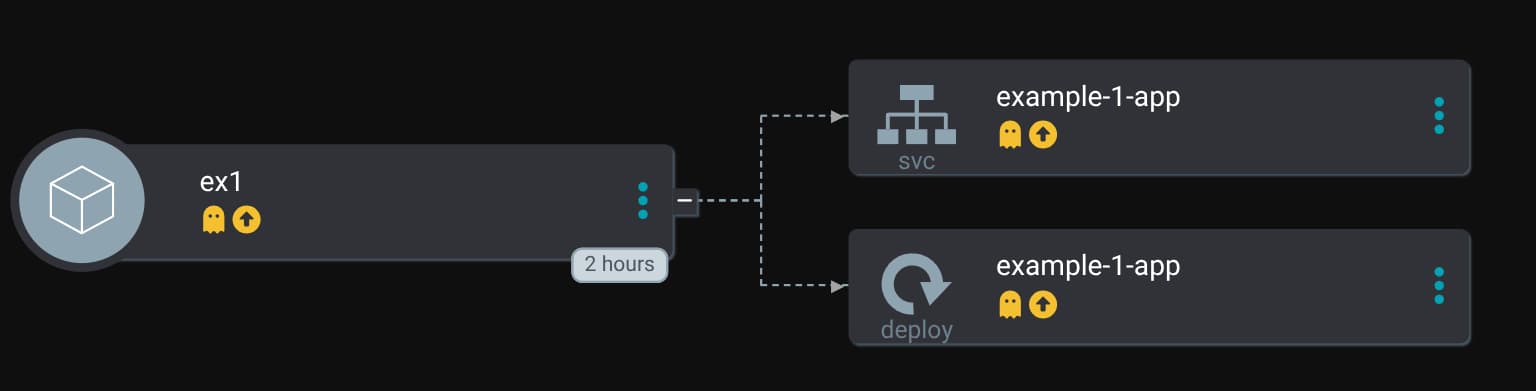
When you click the synch:
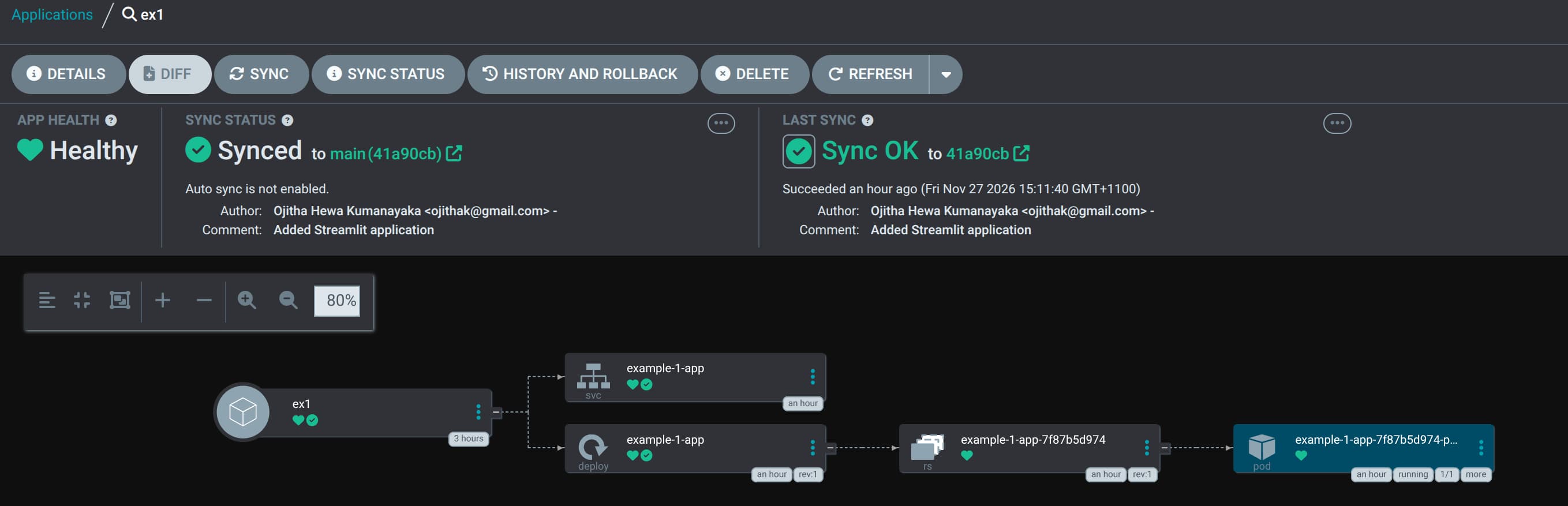
Check the resource after the deployment via synch:
kubectl get pods -n ex1
NAME                             READY   STATUS    RESTARTS   AGE
example-1-app-7f87b5d974-p788m   1/1     Running   0          71m
argocd app get ex1
Name:               argocd/ex1
Project:            default
Server:             https://kubernetes.default.svc
Namespace:          ex1
URL:                https://argocd.example.com/applications/ex1
Source:
- Repo:             https://github.com/ojitha/example-1-gitops.git
  Target:           main
  Path:             k8s/plain-manifests
SyncWindow:         Sync Allowed
Sync Policy:        Manual
Sync Status:        Synced to main (41a90cb)
Health Status:      Healthy

GROUP  KIND        NAMESPACE  NAME           STATUS   HEALTH   HOOK  MESSAGE
       Namespace              ex1            Running  Synced         namespace/ex1 created
       Service     ex1        example-1-app  Synced   Healthy        service/example-1-app created
apps   Deployment  ex1        example-1-app  Synced   Healthy        deployment.apps/example-1-app created
First, find the application sync to you cluster:
kubectl -n ex1 get deployments,statefulsets,daemonsets,pods,services,ingresses -o wide
NAME                            READY   UP-TO-DATE   AVAILABLE   AGE   CONTAINERS      IMAGES                        SELECTOR
deployment.apps/example-1-app   1/1     1            1           88m   example-1-app   ojitha/example-1-app:latest   app=example-1-app

NAME                                 READY   STATUS    RESTARTS   AGE   IP            NODE                NOMINATED NODE   READINESS GATES
pod/example-1-app-7f87b5d974-p788m   1/1     Running   0          88m   10.244.1.10   argocd-ex1-worker   <none>           <none>

NAME                    TYPE        CLUSTER-IP     EXTERNAL-IP   PORT(S)   AGE   SELECTOR
service/example-1-app   ClusterIP   10.96.161.13   <none>        80/TCP    88m   app=example-1-app
| Resource | Status | Key details |
|---|---|---|
| Deployment example-1-app | 1/1 replicas ready, up to date, and available | Uses ojitha/example-1-app:latest and selects pods labeled app=example-1-app. |
| Pod example-1-app-7f87b5d974-p788m | Running, 1/1 containers ready, 0 restarts | Runs on argocd-ex1-worker at 10.244.1.10. The app responds on port 8501. |
| Service example-1-app | Internal ClusterIP at 10.96.161.13:80 | Selects pods labeled app=example-1-app. Its targetPort is 80, which caused the connection refusal because the app listens on 8501. |
The first row is the Deployment, deployment.apps/example-1-app. The command explicitly names it as deployment/example-1-app, so kubectl finds a pod managed by that Deployment. The row’s position in the output has no effect.
kubectl -n ex1 port-forward deployment/example-1-app 8081:8501
This forwards local port 8081 directly to port 8501 on the selected pod, where the app listens. We used the Deployment because forwarding through the Service would use its configured targetPort of 80, which caused the connection refusal.
Clean up
Stop the worker first, then the control plane.
docker stop -t 60 argocd-ex1-worker
docker stop -t 60 argocd-ex1-control-plane
argocd-ex1-worker
argocd-ex1-control-plane
Resume the cluster
With Docker running, start the control plane first, then the worker.
kubectl --context kind-argocd-ex1 get nodes
kubectl --context kind-argocd-ex1 -n argocd get pods
NAME                       STATUS   ROLES           AGE   VERSION
argocd-ex1-control-plane   Ready    control-plane   25h   v1.37.0
argocd-ex1-worker          Ready    <none>          25h   v1.37.0
NAME                                                READY   STATUS    RESTARTS      AGE
argocd-application-controller-0                     1/1     Running   2 (29m ago)   24h
argocd-applicationset-controller-5cd5d47f9d-4cjf8   1/1     Running   2 (29m ago)   24h
argocd-dex-server-fdcbfd75b-8cjgg                   1/1     Running   2 (29m ago)   24h
argocd-notifications-controller-7689b76f58-x7gbw    1/1     Running   2 (29m ago)   24h
argocd-redis-d67db4f48-6xk94                        1/1     Running   2 (29m ago)   24h
argocd-repo-server-79bfcf97cd-8559m                 1/1     Running   2 (29m ago)   24h
argocd-server-f5cf659b-np5rl                        1/1     Running   3 (29m ago)   24h
Remove the cluster
kind delete cluster --name argocd-ex1
Deleting cluster "kind" ...
yes | docker system prune
WARNING! This will remove:
  - all stopped containers
  - all networks not used by at least one container
  - all dangling images
  - unused build cache

Are you sure you want to continue? [y/N] Deleted Containers:
d24b314e5cdf509c2f11024e87357990199c87a705f13172ec463bcaa19018ad
c6f545a6fc3ffde5156f84341567678948068d3913396699920b2b34bcd9b017

Deleted Networks:
kind

Deleted build cache objects:
ocfd90oyx4z37shh6hi2a2n91
bpn6mmqy1y6fcqjjylij6q486
swuibnb66m6umomfaq19zkh64
w4yy3pb41dadri8z88trk9be5
pu0kdg9jqbwfmwb1xjqf80e9n
s8u3gy7kbykhgzct3ykq7ohll
fqrzy6nsk6kcgmad6c9f2f9t0
xyt2fvkrgarslarzvx86nriks
w6vu2l8yxkg07enl3dscz1btk
tw1ho2p5h04d92iqvvonrjryy

Total reclaimed space: 711.5MB
However you have to clean the kubectl config as well. Currently cofig:
kubectl config get-contexts
CURRENT   NAME              CLUSTER           AUTHINFO          NAMESPACE
*         kind-argocd-ex1   kind-argocd-ex1   kind-argocd-ex1
As shown above, active context is kind-argocd-ex1. To delete that:
kubectl config delete-context kind-argocd-ex1
warning: this removed your active context, use "kubectl config use-context" to select a different one
deleted context kind-argocd-ex1 from /home/ojitha/.kube/config
kubectl --kubeconfig "$HOME/.kube/config" config delete-cluster kind-argocd-ex1
deleted cluster kind-argocd-ex1 from /home/ojitha/.kube/config
kubectl --kubeconfig "$HOME/.kube/config" config delete-user kind-argocd-ex1
error: cannot delete user kind-argocd-ex1, not in /home/ojitha/.kube/config