Google Gemma 4 MoE (26B) on AMD Ryzen AI
Issues, limitations, and resolution guide for
google/gemma-4-26B-A4B-iton the MINISFORUM AI X1 Pro — an AMD Ryzen AI 9 HX 470 APU with 128 GB unified memory running ROCm 7.2.0 and vLLM 0.20.1.Machine: MINISFORUM AI X1 Pro — AMD Ryzen AI 9 HX 470 (gfx1150 / Radeon 890M)
Stack: Ubuntu 24.04.4 · Kernel 6.17.0-1012-oem · ROCm 7.2.0 · vLLM 0.20.1
- 1. Hardware Architecture
- 2. Model Profile — 26B A4B MoE
- 3. Memory Architecture — The APU Constraint
- 4. Issue Taxonomy
- 5. Issue Deep-Dives
- 6. Backend Limitations
- 7. Performance Analysis
- 8. Resolution Matrix
- 9. Recommendations
- 10 — Gemini CLI Integration via LiteLLM
- Appendix A — Kernel / ROCm Logs Reference
1. Hardware Architecture
1.1 OJAI Machine Specifications
The MINISFORUM AI X1 Pro-470 (say OJAI) is a compact mini PC built around AMD’s Ryzen AI 9 HX 470 processor.1 It was among the first machines to ship with the HX 470, announced at CES 2026.2
| Component | Specification |
|---|---|
| CPU | AMD Ryzen AI 9 HX 470 (Zen 5, 12-core: 4×Zen5 + 8×Zen5C, 24-thread)3 |
| GPU | Radeon 890M iGPU — 16 RDNA 3.5 CUs, gfx1150, 3100 MHz4 |
| NPU | RyzenAI-npu4 (aie2p), 86 TOPS combined CPU+GPU+NPU5 |
| RAM | 2 × 64 GB Micron CT64G56C46S5 DDR5-5600 = 128 GB |
| Storage | NVMe SSD (EXT4, ~3–5 GB/s sequential read) |
| OS | Ubuntu 24.04.4, OEM kernel 6.17.0-1012-oem |
| ROCm | 7.2.0, AMD-SMI 26.2.1 |
| VBIOS | 023.010.002.001.000001 |
1.2 GPU Agent (from rocminfo)
Agent 2: gfx1150
  Compute Units:   16
  SIMDs per CU:    2
  Wavefront Size:  32
  Max Clock:       3100 MHz
  L1 Cache:        32 KB
  L2 Cache:        2048 KB
  Chip ID:         0x150e
  Memory:          APU (unified with system RAM)
  ISA:             amdgcn-amd-amdhsa--gfx1150
Important:
gfx1150is an RDNA 3.5 consumer APU GPU, not an AMD Instinct data centre GPU.6 This distinction is critical — many ROCm kernel optimisations (AITER, pre-tuned MoE configs) target Instinct hardware only and do not apply to this machine.7
2. Model Profile — 26B A4B MoE
2.1 MoE Architecture
The “26B A4B” designation means: 26 billion total parameters, 4 billion active per token. This is a Mixture-of-Experts (MoE) model where a learned router dispatches each token to a small subset of specialised expert networks.8
The “A” in 26B A4B stands for “active parameters” in contrast to the total number of parameters the model contains. By only activating a 4B subset of parameters during inference, the MoE model runs much faster than its 26B total might suggest.8
graph LR
    subgraph Input["Input Token"]
        T["Token embedding"]
    end

    subgraph Router["MoE Router Layer"]
        R["Learned router computes expert scores"]
    end

    subgraph Experts["128 Expert Feed-Forward Networks"]
        direction LR
        E1["Expert 1 ✅ activated"]
        E2["Expert 2 ✅ activated"]
        E3["Expert 3 ✅ activated"]
        E4["Expert 4 ✅ activated"]
        E5["Expert 5 ✅ activated"]
        E6["Expert 6 ✅ activated"]
        E7["Expert 7 ✅ activated"]
        E8["Expert 8 ✅ activated"]
        ES["Shared Expert ✅ always active"]
        EI1["Expert 10..128 ❌ idle this token"]
    end

    subgraph Memory["GPU Device Memory (UMA)"]
        MW["All 128 experts loaded ~52 GB total (must be resident)"]
    end

    T --> R
    R -->|"top-8 selection"| E1
    R -->|"top-8 selection"| E2
    R -->|"top-8 selection"| E3
    R -->|"top-8 selection"| E4
    R -->|"top-8 selection"| E5
    R -->|"top-8 selection"| E6
    R -->|"top-8 selection"| E7
    R -->|"top-8 selection"| E8
    R -->|"always"| ES
    R -.->|"dormant"| EI1

    Experts --> Memory
Key consequence: While only 9 experts (~4B parameters) are used per token, all 26B parameters must be loaded into GPU device memory because the router can select any expert at any time — this is why its baseline memory requirement is much closer to a dense 26B model than a 4B model.9
2.2 Model Specifications
| Property | Value |
|---|---|
| Architecture | Mixture-of-Experts (MoE) |
| Total parameters | 26B |
| Active parameters per token | ~4B (8 selected + 1 shared) |
| Expert count | 128 experts + 1 shared10 |
| Attention type | Hybrid: local sliding window + global |
| Head dimensions | Local: 256 · Global: 512 (heterogeneous) |
| Context window | 256K tokens8 |
| Sliding window size | 1024 tokens (local layers) |
| Weights on disk (bf16) | ~50 GB (2 shards) |
| Weights in GPU memory (bf16) | ~52 GB |
| Weights in memory (Q4_K_M) | ~13 GB |
| HuggingFace model ID | google/gemma-4-26B-A4B-it |
| Ollama tag | gemma4:26b |
| Licence | Apache 2.0 |
2.3 Shard Structure
The HuggingFace checkpoint ships as two safetensors shards. The safetensors format stores weights as contiguous raw binary blocks and uses OS-level memory mapping for efficient access.11
| Shard | Size (bf16) | Contents |
|---|---|---|
model-00001-of-00002.safetensors |
~46.5 GB | Most expert weights, embeddings |
model-00002-of-00002.safetensors |
~3.5 GB | Remaining layers, output head |
| Total | ~50 GB | Full model |
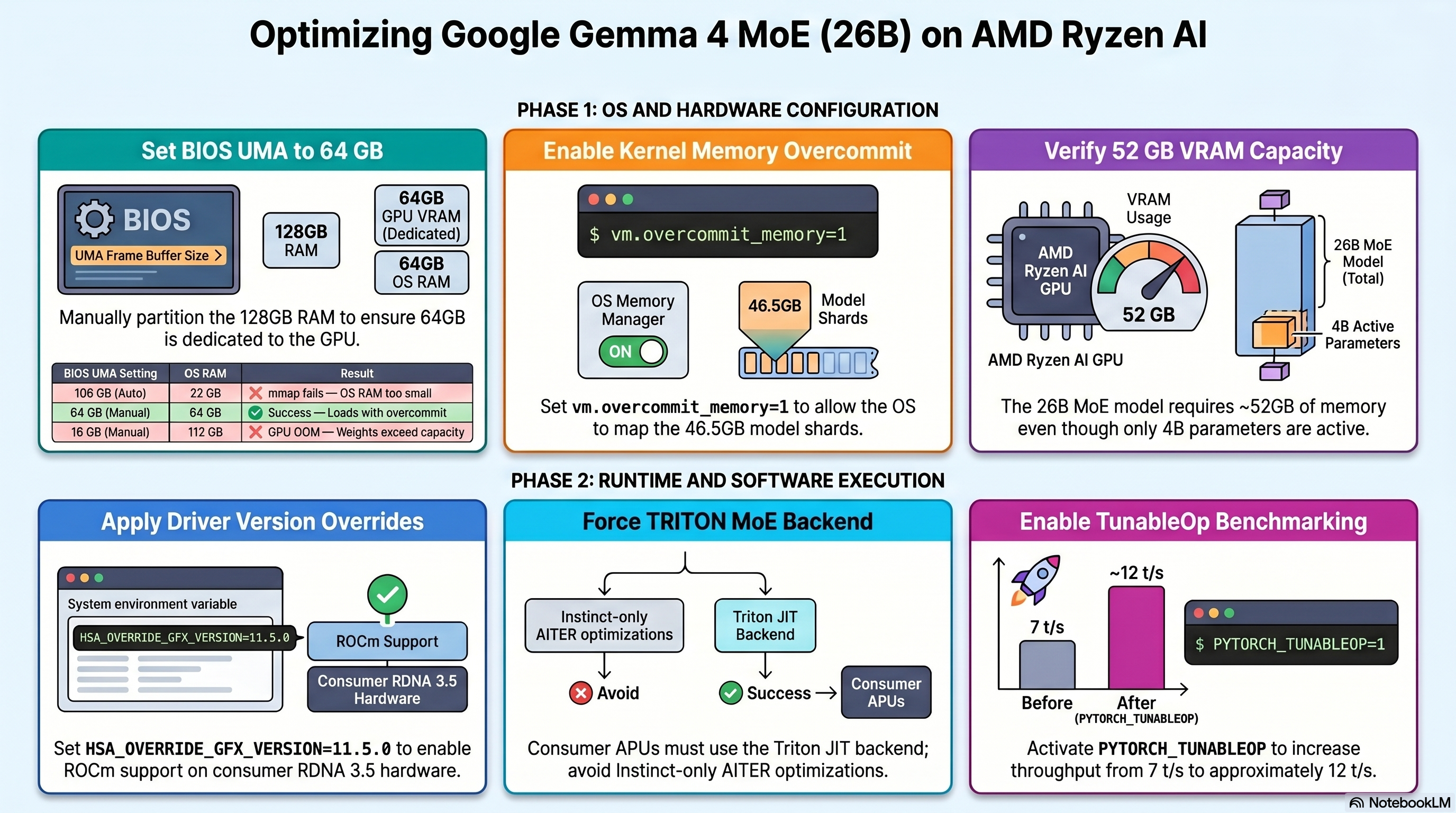
The large shard 1 size (~46.5 GB) is the root cause of the mmap failures documented in this guide.
3. Memory Architecture — The APU Constraint
3.1 Unified Memory — How It Works
Unlike discrete GPUs which have dedicated GDDR/HBM, the Radeon 890M shares the same physical LPDDR5X DIMMs as the CPU.4 The BIOS partitions this single pool via a UMA (Unified Memory Architecture) framebuffer setting.
graph LR
    subgraph Physical["Physical: 128 GB DDR5-5600 (Dual Channel, 89.6 GB/s bandwidth)"]
        DIMM_A["DIMM 0 Channel A — 64 GB Micron DDR5-5600"]
        DIMM_B["DIMM 0 Channel B — 64 GB Micron DDR5-5600"]
    end

    subgraph BIOS["BIOS UMA Partition (set in UEFI firmware)"]
        UMA["GPU UMA Reservation Reported as GPU device memory by ROCm Configurable: 8 GB – 106 GB"]
        OS_RAM["OS-Visible RAM 128 GB minus UMA Used by Linux kernel, Docker, mmap"]
    end

    subgraph vLLM_GPU["vLLM GPU Allocations (from UMA pool)"]
        GPU_WTS["Model Weights ~52 GB at bf16 Pre-allocated at startup"]
        KV["KV Cache Blocks Remainder after weights ~5 GB at 64 GB UMA"]
        ACT["Activations + Runtime ~2 GB overhead"]
    end

    subgraph vLLM_CPU["CPU-side Allocations (from OS RAM)"]
        MMAP["safetensors mmap ~50 GB virtual (shard 1: 46.5 GB)"]
        DOCKER["Docker + OS overhead ~3 GB"]
    end

    Physical --> BIOS
    UMA --> GPU_WTS
    UMA --> KV
    UMA --> ACT
    OS_RAM --> MMAP
    OS_RAM --> DOCKER
3.2 BIOS UMA Impact — Observed Configurations
| BIOS UMA Setting | OS Sees | GPU device mem | 26B A4B Result |
|---|---|---|---|
| ~106 GB (auto, 128 GB RAM) | ~22 GB | 106 GB | ❌ mmap fails — OS RAM too small |
| ~66 GB (auto, 96 GB RAM) | ~62 GB | 66 GB | ❌ mmap fails without overcommit |
| 64 GB (manual — recommended) | ~64 GB | 64 GB | ✅ Loads with overcommit=1 |
| 16 GB (manual) | ~112 GB | 16 GB | ❌ GPU OOM — weights need ~52 GB |
| 8 GB (manual) | ~120 GB | 8 GB | ❌ GPU OOM — weights need ~52 GB |
Recommended BIOS UMA: 64 GB for the 26B A4B model.
3.3 Memory Budget Mathematics
GPU Device Memory Budget
All 26B expert weights must reside in GPU device memory simultaneously.9
\[W_{26B} = 26 \times 10^9 \text{ params} \times 2 \text{ bytes (bfloat16)} = 52 \text{ GB}\]Adding runtime overhead (activations, graph buffers, HIP runtime):
\[M_{GPU}^{total} = W_{26B} + M_{overhead} \approx 52 + 2 = 54 \text{ GB}\]With 64 GB UMA and --gpu-memory-utilization 0.92:
Context Length from KV Cache
Approximate context tokens supported at the available KV cache size:
\[N_{tokens} \approx \frac{M_{KV}^{available}}{0.5 \text{ MB / 1K tokens}} = \frac{4.88 \times 10^3 \text{ MB}}{0.5 \text{ MB}} \times 1000 \approx \mathbf{9{,}760 \text{ tokens}}\]CPU-side mmap Budget
The safetensors loader maps the raw bf16 file into virtual address space before any GPU transfer.12 The entire shard file is mapped at once via the OS mmap() syscall:11
Linux’s CommitLimit under default overcommit_memory=0 heuristic mode:13
With 64 GB OS RAM, overcommit_ratio=50 (default), 8 GB swap:14
Since $M_{mmap} = 50 \text{ GB} > \text{CommitLimit} = 40 \text{ GB}$, the kernel refuses the mmap with ENOMEM (errno 12).15
Fix:
vm.overcommit_memory=1bypasses CommitLimit checking entirely, allowing the virtual address reservation.13 Physical pages are then demand-paged from NVMe as weights are accessed.
Memory Bandwidth — Inference Throughput Ceiling
DDR5-5600 dual-channel theoretical peak bandwidth:3
\[BW_{max} = 2 \times 5600 \text{ MT/s} \times 8 \text{ bytes} = 89.6 \text{ GB/s}\]For MoE inference, only active expert weights are read per token (~4B params at bf16):8
\[BW_{token}^{bf16} = 4 \times 10^9 \times 2 \text{ bytes} = 8 \text{ GB/token}\]Theoretical throughput ceiling:
\[t/s_{ceiling}^{vLLM} = \frac{89.6}{8} = \mathbf{11.2 \text{ t/s}}\]Measured: ~7 t/s — the gap below ceiling is due to attention computation, kernel launch overhead, and scheduling latency.
4. Issue Taxonomy
mindmap
  root((26B A4B Issues on OJAI))
    Memory
      BIOS UMA misconfigured
        Auto-scaled to 106 GB on 128 GB RAM
        OS left with only 22 GB
      CommitLimit exceeded
        overcommit_memory=0 default
        50 GB mmap > 40 GB CommitLimit
      GPU OOM during init
        16 GB UMA attempted
        Weight allocation needs ~52 GB
      KV cache too small
        Only ~5 GB at 64 GB UMA
        Limits context to ~10K tokens
      Auto-prefetch disabled
        EXT4 not a network filesystem
        OS RAM less than 90% of shard size
    Kernel and Driver
      gfx1150 unofficial ROCm support
        HSA_OVERRIDE_GFX_VERSION required
        Not in official AMD support list
      AITER backend unsupported
        Instinct GPUs only
        Crashes if forced on gfx1150
      MoE config 0x150e.json missing
        No pre-tuned kernel tiling
        Generic defaults used
      rms_norm native only
        No fused kernel priority for gfx1150
    vLLM ROCm Build Gaps
      No speculative decoding
        Absent from all ROCm vLLM images
        gemma4 image and latest image
      expandable_segments unsupported
        HIP allocator limitation
        Causes harmless warning
      NIXL unavailable
        UCX warning on every startup
    Docker Script Issues
      Inline bash comments crash docker run
        Hash comments break argument parsing
        Must be placed outside docker run block
      PYTORCH_ALLOC_CONF unsupported
        expandable_segments not on HIP
      AITER env vars crash model init
        Must be completely removed
5. Issue Deep-Dives
5.1 The mmap Failure Chain
This was the first and most persistent failure. Every attempted run failed at the same point: the safetensors loader trying to memory-map shard 1. This is a known issue when safetensors files are larger than available system RAM.12
flowchart TD
    A["Docker run started vLLM engine init"] --> B["ROCm initialises GPU device memory (UMA pool claimed)"]
    B --> C["safetensors loader called for shard 1 46.5 GB file"]
    C --> D["safe_open calls mmap syscall requesting 46.5 GB"]
    D --> E{"Kernel checks vm.overcommit_memory"}

    E -->|"= 0 heuristic mode Committed_AS check"| F{"Committed_AS + 46.5 GB vs CommitLimit 40 GB"}
    F -->|"exceeds limit"| G["❌ errno 12 ENOMEM Cannot allocate memory"]
    G --> H["RuntimeError: unable to mmap 49907246508 bytes from file model-00001-of-00002.safetensors"]

    E -->|"= 1 always overcommit no CommitLimit check"| I["✅ Virtual address space granted for 46.5 GB"]
    I --> J["OS demand-pages physical RAM as weights are accessed sequentially"]
    J --> K["Weights streamed from NVMe into OS page cache"]
    K --> L["vLLM copies tensors from CPU page cache to GPU device memory"]
    L --> M["✅ Model loaded successfully"]

    style G fill:#c0392b,color:#fff
    style H fill:#c0392b,color:#fff
    style I fill:#27ae60,color:#fff
    style M fill:#27ae60,color:#fff
The Three mmap Failure Scenarios Encountered
| RAM | BIOS UMA | OS RAM | CommitLimit | mmap 46.5 GB | Result |
|---|---|---|---|---|---|
| 64 GB | ~34 GB | ~30 GB | ~23 GB | ❌ | ENOMEM |
| 96 GB | ~66 GB | ~62 GB | ~39 GB | ❌ | ENOMEM |
| 128 GB | ~106 GB | ~22 GB | ~19 GB | ❌ | ENOMEM |
| 128 GB | 64 GB + overcommit=1 | ~64 GB | bypassed | ✅ | Loads |
5.2 BIOS UMA Configuration Journey
timeline
    title BIOS UMA Discovery on OJAI
    section 64 GB RAM installed
        rocminfo shows GPU pool 64 GB : OS sees 30 GB
        mmap 46.5 GB shard fails : CommitLimit only 23.5 GB
        Hypothesis: insufficient RAM
    section 96 GB RAM upgrade
        BIOS auto-scales UMA to ~66 GB : OS sees ~62 GB
        mmap still fails : CommitLimit 39 GB still under 46.5 GB
        overcommit_memory=1 applied : mmap succeeds
        Model loads successfully
    section 128 GB RAM installed
        BIOS auto-scales UMA to ~106 GB : OS left with only 22 GB
        Model fails again : mmap impossible at 22 GB OS RAM
        UMA set to 16 GB manually : OS sees 112 GB
        GPU OOM at model init : 16 GB too small for 52 GB weights
        UMA set to 64 GB manually : OS sees 64 GB
        overcommit_memory=1 confirmed : Model loads and runs
5.3 GPU OOM During Model Initialisation
When BIOS UMA was set to 16 GB (to maximise OS RAM), the engine crashed before loading any weights. The failure occurred during model graph construction:
Gemma4Model.__init__()
  └── Gemma4DecoderLayer.__init__()
        └── Gemma4MoE.__init__()
              └── FusedMoE.__init__()
                    └── UnquantizedFusedMoEMethod.create_weights()
                          └── torch.empty(expert_weight_tensor)
                                ↳ HIP out of memory
                                  GPU 0: 16.00 GiB total
                                  296.00 MiB free
                                  Tried to allocate: 968.00 MiB
vLLM pre-allocates empty GPU tensors for all expert weights before loading checkpoint values.10 This means the full ~52 GB weight footprint must fit in GPU device memory before a single value is loaded from disk. A 16 GB UMA can never satisfy this requirement.
Required minimum UMA for 26B A4B: ~56 GB. Recommended: 64 GB.
5.4 Auto-Prefetch Disabled
vLLM 0.20.1 introduced intelligent prefetch that pipelines shard loading with GPU transfer. It was disabled on OJAI:
Checkpoint size: 58.25 GiB. Available RAM: 22.20 GiB.
Auto-prefetch is disabled because the filesystem (EXT4) is not a recognized
network FS (NFS/Lustre) and the checkpoint size (58.25 GiB) exceeds 90%
of available RAM (22.20 GiB).
The prefetch threshold check:
\[\text{Prefetch enabled iff: } \text{AvailableRAM} \geq 0.9 \times \text{CheckpointSize}\] \[22.20 \text{ GB} \geq 0.9 \times 50 \text{ GB} = 45 \text{ GB} \quad \Rightarrow \text{ FALSE}\]This is the correct decision — forcing prefetch with only 22 GB RAM for a 50 GB checkpoint would saturate the 8 GB swap. The NVMe loads both shards in under 20 seconds sequentially, which is acceptable.
5.5 Docker Script Bash Parsing Error
An unexpected source of failure: inline # comments inside multi-line docker run commands break bash argument parsing, causing all subsequent arguments including $IMAGE to be silently dropped:
# This BREAKS bash argument parsing:
docker run --rm -it \
  -e HSA_OVERRIDE_GFX_VERSION=11.5.0 \
  # This comment terminates the command ← ERROR
  -e HSA_ENABLE_SDMA=0 \
  "$IMAGE" "$MODEL"
Error produced:
docker: 'docker run' requires at least 1 argument
Usage:  docker run [OPTIONS] IMAGE [COMMAND] [ARG...]
All comments must be placed outside the
docker runblock.
6. Backend Limitations
6.1 MoE Backend Selection — What Gets Chosen for gfx1150
vLLM iterates a priority-ordered list of MoE backends and selects the first one that passes the is_supported_config() check for the current platform.16
flowchart TD
    A["vLLM starts FusedMoE layer init"] --> B{"Any AITER env vars set?"}

    B -->|"VLLM_ROCM_USE_AITER=1 or AITER_MOE=1 (attempted)"| C{"AITER kernel supports gfx1150?"}
    C -->|"No — Instinct only MI300X / MI250X / MI250"| D["❌ ValueError ROCm AITER does not support current device rocm Engine crashes"]

    B -->|"Not set — auto mode"| E["Iterate priority list for current platform"]
    E --> F["1. FLASHINFER_TRTLLM ❌    CUDA/NVIDIA only"]
    F --> G["2. FLASHINFER_CUTLASS ❌    CUDA/NVIDIA only"]
    G --> H["3. ROCm AITER ❌    Instinct GPUs only    gfx1150 not in allowlist"]
    H --> I["4. TRITON ✅    Portable via Triton JIT    Works on gfx1150"]
    I --> J["INFO: Using TRITON Unquantized MoE backend out of potential backends: ROCm AITER, TRITON, BATCHED_TRITON"]

    style D fill:#c0392b,color:#fff
    style I fill:#27ae60,color:#fff
    style J fill:#27ae60,color:#fff
6.2 Backend Support Matrix for gfx1150
| Backend | gfx1150 | Why |
|---|---|---|
FLASHINFER_TRTLLM |
❌ | NVIDIA CUDA only, not compiled for ROCm |
FLASHINFER_CUTLASS |
❌ | NVIDIA CUDA only, not compiled for ROCm |
ROCm AITER |
❌ | AMD Instinct only (MI300X, MI250X, MI250)17 |
TRITON |
✅ | Portable Triton JIT — works via HSA override |
BATCHED_TRITON |
✅ | Batched variant for specific activation formats |
| Speculative decoding | ❌ | Not in any ROCm vLLM build (0.18.x, 0.20.1)18 |
6.3 Missing MoE Tuning Configuration
Status change: ⚠️ In progress → ✅ Resolved
Add under the existing warning text:
Resolution (May 2026): The tune_fused_moe.py script no longer exists in vllm/vllm-openai-rocm:latest (vLLM 0.20.1). The replacement benchmark script at /app/vllm/benchmarks/kernels/benchmark_moe_defaults.py runs predefined Mixtral configurations only — it does not generate per-device configs for arbitrary models.
The config must be created manually using the format from existing AMD configs as a template. Key constraints for AMD_Radeon_890M with Gemma 4 26B (E=128, N=704):
BLOCK_SIZE_Nmust divide N=704 evenly → only 16, 32, or 64 valid (704/128 = 5.5 ✗)BLOCK_SIZE_Kmust divide hidden_dim=2560 → 64 or 128num_warpsmax 4 for 16 CU RDNA 3.5matrix_instr_nonkdim=16throughout (not 32)
Then insert the full JSON:
{
    "1":    { "BLOCK_SIZE_M": 16, "BLOCK_SIZE_N": 16, "BLOCK_SIZE_K": 64,
              "GROUP_SIZE_M": 1, "num_warps": 2, "num_stages": 2,
              "waves_per_eu": 0, "matrix_instr_nonkdim": 16, "kpack": 1 },
    "2":    { "BLOCK_SIZE_M": 16, "BLOCK_SIZE_N": 32, "BLOCK_SIZE_K": 64,
              "GROUP_SIZE_M": 1, "num_warps": 2, "num_stages": 2,
              "waves_per_eu": 0, "matrix_instr_nonkdim": 16, "kpack": 1 },
    "4":    { "BLOCK_SIZE_M": 16, "BLOCK_SIZE_N": 32, "BLOCK_SIZE_K": 64,
              "GROUP_SIZE_M": 1, "num_warps": 2, "num_stages": 2,
              "waves_per_eu": 0, "matrix_instr_nonkdim": 16, "kpack": 1 },
    "8":    { "BLOCK_SIZE_M": 16, "BLOCK_SIZE_N": 32, "BLOCK_SIZE_K": 64,
              "GROUP_SIZE_M": 1, "num_warps": 2, "num_stages": 2,
              "waves_per_eu": 0, "matrix_instr_nonkdim": 16, "kpack": 2 },
    "16":   { "BLOCK_SIZE_M": 16, "BLOCK_SIZE_N": 64, "BLOCK_SIZE_K": 64,
              "GROUP_SIZE_M": 1, "num_warps": 4, "num_stages": 2,
              "waves_per_eu": 0, "matrix_instr_nonkdim": 16, "kpack": 2 },
    "24":   { "BLOCK_SIZE_M": 16, "BLOCK_SIZE_N": 64, "BLOCK_SIZE_K": 64,
              "GROUP_SIZE_M": 1, "num_warps": 4, "num_stages": 2,
              "waves_per_eu": 0, "matrix_instr_nonkdim": 16, "kpack": 2 },
    "32":   { "BLOCK_SIZE_M": 32, "BLOCK_SIZE_N": 64, "BLOCK_SIZE_K": 64,
              "GROUP_SIZE_M": 4, "num_warps": 4, "num_stages": 2,
              "waves_per_eu": 0, "matrix_instr_nonkdim": 16, "kpack": 2 },
    "48":   { "BLOCK_SIZE_M": 32, "BLOCK_SIZE_N": 64, "BLOCK_SIZE_K": 64,
              "GROUP_SIZE_M": 4, "num_warps": 4, "num_stages": 2,
              "waves_per_eu": 0, "matrix_instr_nonkdim": 16, "kpack": 2 },
    "64":   { "BLOCK_SIZE_M": 64, "BLOCK_SIZE_N": 64, "BLOCK_SIZE_K": 64,
              "GROUP_SIZE_M": 4, "num_warps": 4, "num_stages": 2,
              "waves_per_eu": 0, "matrix_instr_nonkdim": 16, "kpack": 2 },
    "96":   { "BLOCK_SIZE_M": 64, "BLOCK_SIZE_N": 64, "BLOCK_SIZE_K": 64,
              "GROUP_SIZE_M": 4, "num_warps": 4, "num_stages": 2,
              "waves_per_eu": 0, "matrix_instr_nonkdim": 16, "kpack": 2 },
    "128":  { "BLOCK_SIZE_M": 64, "BLOCK_SIZE_N": 64, "BLOCK_SIZE_K": 64,
              "GROUP_SIZE_M": 4, "num_warps": 4, "num_stages": 2,
              "waves_per_eu": 0, "matrix_instr_nonkdim": 16, "kpack": 2 },
    "256":  { "BLOCK_SIZE_M": 64, "BLOCK_SIZE_N": 64, "BLOCK_SIZE_K": 64,
              "GROUP_SIZE_M": 4, "num_warps": 4, "num_stages": 2,
              "waves_per_eu": 0, "matrix_instr_nonkdim": 16, "kpack": 2 },
    "512":  { "BLOCK_SIZE_M": 64, "BLOCK_SIZE_N": 64, "BLOCK_SIZE_K": 64,
              "GROUP_SIZE_M": 4, "num_warps": 4, "num_stages": 2,
              "waves_per_eu": 0, "matrix_instr_nonkdim": 16, "kpack": 2 },
    "1024": { "BLOCK_SIZE_M": 64, "BLOCK_SIZE_N": 64, "BLOCK_SIZE_K": 64,
              "GROUP_SIZE_M": 4, "num_warps": 4, "num_stages": 2,
              "waves_per_eu": 0, "matrix_instr_nonkdim": 16, "kpack": 2 }
}
Mount it via docker volume — do not copy into the image:
bash
-v "$HOME/moe_configs:/usr/local/lib/python3.12/dist-packages/vllm/model_executor/layers/fused_moe/configs" \
Confirmed working — startup log shows:
Using configuration from .../E=128,N=704,device_name=AMD_Radeon_890M.json for MoE layer.
6.4 Attention Backend — Forced to TRITON
Gemma 4 uses heterogeneous head dimensions (local layers: 256, global layers: 512). vLLM detects this and forces the TRITON attention backend regardless of other settings:
INFO: Gemma4 model has heterogeneous head dimensions
      (head_dim=256, global_head_dim=512).
      Forcing TRITON_ATTN backend to prevent mixed-backend
      numerical divergence.
This is correct behaviour — mixing attention backends across layers would produce numerically incorrect outputs.
6.5 Missing gfx1150 Kernel Priorities
The rms_norm operation has no tuned kernel priority for gfx1150:
Final IR op priority after setting platform defaults:
IrOpPriorityConfig(rms_norm=['native'])
nativemeans plain PyTorch rather than a fused Triton kernel. A fused kernel computes normalisation in a single GPU pass without writing intermediate values back to memory — important on a memory-bandwidth-limited APU. Note that AOTriton 0.10b does listgfx1150as an experimentally supported target,19 suggesting fused kernel priority configs may arrive in a future ROCm PyTorch release.
6.6 ROCm vLLM Feature Gap
| Feature | CUDA vLLM | ROCm vLLM 0.20.1 | Impact on 26B |
|---|---|---|---|
| Speculative decoding | ✅ | ❌18 | −8–12 t/s potential gain lost |
| AITER MoE kernels | N/A | ❌ gfx115017 | −20–40% MoE throughput |
| Pre-tuned MoE configs | ✅ | ❌ 0x150e | Suboptimal kernel tiling |
| Flash Attention v2 | ✅ | TRITON fallback | Minor |
expandable_segments |
✅ | ❌ HIP limit | Minor allocator overhead |
| TunableOp GEMM | ✅ | ✅20 | +5–20% after cache built |
| Prefix caching | ✅ | ✅21 | System prompt reuse |
| Chunked prefill | ✅ | ✅21 | Long-context efficiency |
| Tool calling | ✅ | ✅ | Full support with gemma4 parser |
7. Performance Analysis
7.1 Observed Throughput
| Runtime | Format | t/s | KV Cache | Concurrency |
|---|---|---|---|---|
| Ollama | Q4\_K\_M (~13 GB) | 17 | ~8K default | Single user |
| vLLM bf16 | bfloat16 (~52 GB) | 7–8 | 32K configured | API, multi-user |
| vLLM bf16 + MoE config | bfloat16 (~52 GB) | ~8 (confirmed) | 32K, 214K tokens cached | ✅ Verified May 2026 |
| vLLM bf16 + TunableOp | bfloat16 (~52 GB) | ~12(expected) | 32K configured | After first-run tuning |
Also add confirmed KV cache stats:
Available KV cache memory: 7.97 GiB
GPU KV cache size: 214,454 tokens
Maximum concurrency for 32,768 tokens per request: 6.54x
7.2 Why Ollama is Faster for Single-User Decode
The difference is entirely due to bytes-per-parameter read per token. Inference on memory-bandwidth-limited hardware (like APUs) is bottlenecked by how much data must be read from DRAM per generated token.22
graph LR
    subgraph Ollama["Ollama — Q4_K_M"]
        O1["4B active params × 0.5 bytes Q4 = 2 GB per token read"]
        O2["89.6 GB/s bandwidth ÷ 2 GB/token = 44.8 t/s ceiling"]
        O3["Measured: 17 t/s (overhead + attention)"]
        O1 --> O2 --> O3
    end

    subgraph vLLM["vLLM — bfloat16"]
        V1["4B active params × 2 bytes bf16 = 8 GB per token read"]
        V2["89.6 GB/s bandwidth ÷ 8 GB/token = 11.2 t/s ceiling"]
        V3["Measured: 7 t/s (overhead + attention + TRITON)"]
        V1 --> V2 --> V3
    end
The 4× difference in bytes per parameter (Q4_K_M vs bfloat16) directly explains the throughput ratio:
\[\frac{t/s_{Ollama}}{t/s_{vLLM}} \approx \frac{BW_{token}^{vLLM}}{BW_{token}^{Ollama}} = \frac{8 \text{ GB}}{2 \text{ GB}} = 4\times \quad \text{(theoretical)}\] \[\frac{17}{7} \approx 2.4\times \quad \text{(measured — gap narrowed by vLLM scheduling efficiency)}\]7.3 Multi-User Throughput — Where vLLM Wins
vLLM uses PagedAttention and continuous batching — a technique that processes requests at the iteration level, immediately filling slots freed by completed requests rather than waiting for a full batch to finish.23 Ollama processes requests sequentially:
\[\text{Total throughput}_{Ollama}^{N \text{ users}} = 17 \text{ t/s (shared, each user waits)}\] \[\text{Total throughput}_{vLLM}^{N \text{ users}} \approx \min\!\left(N \times 7,\ BW_{ceiling}\right)\]For 5 concurrent users:
\[\text{vLLM aggregate} \approx 35 \text{ t/s} \quad \text{vs} \quad \text{Ollama} = 17 \text{ t/s (all 5 users sharing)}\]For single-user personal use, Ollama is faster. For a shared API server serving multiple clients, vLLM provides roughly double the aggregate throughput.
7.4 TunableOp Impact
PYTORCH_TUNABLEOP_TUNING=1 instructs PyTorch to benchmark every available HIP GEMM kernel configuration on first run and cache the fastest per matrix shape.24 Results are saved to a CSV file and reused on subsequent runs — a standard optimisation technique for ROCm AI workloads.20
sequenceDiagram
    participant D as Docker startup
    participant T as TunableOp
    participant C as CSV cache
    participant G as GPU kernels

    D->>T: Model loaded, first GEMM encountered
    T->>G: Benchmark kernel config 1 (e.g., tile 64x64)
    G-->>T: 8.2 ms
    T->>G: Benchmark kernel config 2 (e.g., tile 128x64)
    G-->>T: 6.1 ms
    T->>G: Benchmark kernel config N...
    G-->>T: varies
    T->>C: Save best config to gemma4_gfx1150.csv
    Note over D,C: First run: +10-15 min for tuning

    D->>C: Second run: load cached configs
    C-->>D: Best kernel per GEMM shape
    D->>G: Execute with tuned kernels directly
    Note over D,G: Subsequent runs: full speed immediately
Expected throughput after tuning: ~12 t/s (from ~7 t/s baseline).
8. Resolution Matrix
8.1 Complete Issue → Fix Map
flowchart TD
    subgraph Issues["Issues Encountered"]
        I1["mmap ENOMEM 46.5 GB shard fails CommitLimit exceeded"]
        I2["GPU OOM at init 16 GB UMA too small for 52 GB weights"]
        I3["AITER ValueError gfx1150 not in AITER allowlist"]
        I4["expandable_segments unsupported on HIP"]
        I5["Speculative decoding not in ROCm vLLM"]
        I6["MoE config missing 0x150e.json absent"]
        I7["Docker run crashes inline hash comments"]
        I8["auto-prefetch disabled OS RAM too small"]
        I9["rms_norm native no fused kernel"]
    end

    subgraph Fixes["Applied Fixes / Status"]
        F1["sudo sysctl -w vm.overcommit_memory=1 BIOS UMA = 64 GB ✅ Resolved"]
        F2["BIOS UMA = 64 GB minimum ✅ Resolved"]
        F3["Remove VLLM_ROCM_USE_AITER vars Use TRITON default ✅ Resolved"]
        F4["Remove PYTORCH_ALLOC_CONF from docker script ✅ Resolved"]
        F5["Await ROCm vLLM update ❌ Unresolved — upstream"]
        F6["Generate via benchmark script pending ⚠️ In progress"]
        F7["Move comments outside docker run block ✅ Resolved"]
        F8["Reduce BIOS UMA for more OS RAM ⚠️ Trade-off"]
        F9["Await gfx1150 kernel priority config ⚠️ Upstream"]
    end

    I1 --> F1
    I2 --> F2
    I3 --> F3
    I4 --> F4
    I5 --> F5
    I6 --> F6
    I7 --> F7
    I8 --> F8
    I9 --> F9
8.2 Current Status Summary
| Issue | Status | Fix Applied |
|---|---|---|
| mmap ENOMEM on shard 1 | ✅ Resolved | vm.overcommit_memory=1 + BIOS UMA 64 GB |
| GPU OOM at model init | ✅ Resolved | BIOS UMA = 64 GB |
| AITER backend crash | ✅ Resolved | Removed VLLM_ROCM_USE_AITER* env vars |
expandable_segments warning |
✅ Resolved | Removed PYTORCH_ALLOC_CONF |
| Docker script bash error | ✅ Resolved | Moved all # comments outside docker run |
| Speculative decoding missing | ❌ Open | ROCm vLLM upstream limitation18 |
| MoE config 0x150e.json | ✅ Resolved | UManual JSON created — tune_fused_moe.py removed in vLLM 0.20.1; config derived from RDNA 3.5 constraints |
| Auto-prefetch disabled | ⚠️ Acceptable | EXT4 + RAM constraint; sequential load OK |
rms_norm native fallback |
⚠️ Acceptable | Minor cost; awaiting upstream gfx1150 config19 |
9. Recommendations
9.1 Pre-Flight Checklist
Verify the following before every
docker runto avoid preventable failures.
# 1. OS RAM must be ~64 GB (confirms BIOS UMA = 64 GB)
free -h

# 2. overcommit must be 1
cat /proc/sys/vm/overcommit_memory

# 3. If not 1, set it (and make permanent):
sudo sysctl -w vm.overcommit_memory=1
echo "vm.overcommit_memory=1" | sudo tee /etc/sysctl.d/99-rocm-vllm.conf
sudo sysctl -p /etc/sysctl.d/99-rocm-vllm.conf

# 4. TunableOp cache directory must exist
mkdir -p "$HOME/.cache/tunableop"
9.2 Definitive Working Docker Script
#!/usr/bin/env bash
set -euo pipefail

IMAGE=vllm/vllm-openai-rocm:latest
MODEL=google/gemma-4-26B-A4B-it

mkdir -p "$HOME/.cache/tunableop"
sudo sysctl -w vm.overcommit_memory=1

docker run --rm -it \
  --name vllm-gemma4 \
  --network=host \
  --ipc=host \
  --shm-size=4G \
  --ulimit memlock=-1 \
  \
  --device=/dev/kfd \
  --device=/dev/dri \
  --group-add=video \
  --group-add=render \
  --cap-add=SYS_PTRACE \
  --security-opt seccomp=unconfined \
  \
  -e HSA_OVERRIDE_GFX_VERSION=11.5.0 \
  -e HSA_ENABLE_SDMA=0 \
  -e ROCBLAS_USE_HIPBLASLT=1 \
  -e HIP_FORCE_DEV_KERNARG=1 \
  -e SAFETENSORS_FAST_GPU=1 \
  -e TORCH_ROCM_AOTRITON_ENABLE_EXPERIMENTAL=1 \
  -e PYTORCH_TUNABLEOP_ENABLED=1 \
  -e PYTORCH_TUNABLEOP_TUNING=1 \
  -e PYTORCH_TUNABLEOP_VERBOSE=0 \
  -e PYTORCH_TUNABLEOP_FILENAME=/root/.cache/tunableop/gemma4_gfx1150.csv \
  -e NCCL_P2P_DISABLE=1 \
  -e NCCL_SHM_DISABLE=1 \
  -e TOKENIZERS_PARALLELISM=false \
  -e HF_TOKEN="${HF_TOKEN:-}" \
  \
  -v "$HOME/.cache/huggingface:/root/.cache/huggingface" \
  -v "$HOME/.cache/vllm:/root/.cache/vllm" \
  -v "$HOME/.cache/tunableop:/root/.cache/tunableop" \
  -v "$HOME/models:/app/models" \
  -v "$HOME/workspace:/app/workspace" \
  \
  "$IMAGE" \
    "$MODEL" \
    --dtype bfloat16 \
    --max-model-len 32768 \
    --gpu-memory-utilization 0.92 \
    --enable-prefix-caching \
    --enable-auto-tool-choice \
    --tool-call-parser gemma4 \
    --max-num-seqs 4 \
    --block-size 32 \
    --disable-log-requests \
    --host 0.0.0.0 \
    --port 8000
9.3 vLLM Flag Explanations
| Flag | Value | Reason |
|---|---|---|
--dtype bfloat16 |
bfloat16 | Native AMD dtype — avoids the cast overhead warned in startup logs |
--max-model-len 32768 |
32K tokens | Balances KV cache size vs context length at 64 GB UMA |
--gpu-memory-utilization 0.92 |
92% | Leaves 8% headroom for runtime fragmentation |
--enable-prefix-caching |
on | Reuses KV cache for repeated system prompts21 |
--enable-auto-tool-choice |
on | Enables function/tool calling |
--tool-call-parser gemma4 |
gemma4 | Gemma 4 specific tool call format |
--max-num-seqs 4 |
4 | Tuned for single APU — reduces scheduler overhead16 |
--block-size 32 |
32 | Larger KV blocks reduce PagedAttention table lookups23 |
--disable-log-requests |
on | Removes per-request stdout overhead |
9.4 Environment Variable Reference
| Variable | Status | Effect |
|---|---|---|
HSA_OVERRIDE_GFX_VERSION=11.5.0 |
✅ Required | Enables ROCm on gfx115025 |
HSA_ENABLE_SDMA=0 |
✅ Recommended | Faster APU unified memory transfer path |
ROCBLAS_USE_HIPBLASLT=1 |
✅ Recommended | Faster GEMM via hipBLASLt24 |
HIP_FORCE_DEV_KERNARG=1 |
✅ Recommended | Kernel argument optimisation for HIP |
SAFETENSORS_FAST_GPU=1 |
✅ Recommended | Faster weight loading from safetensors |
TORCH_ROCM_AOTRITON_ENABLE_EXPERIMENTAL=1 |
✅ Recommended | AOTriton experimental attention kernels19 |
PYTORCH_TUNABLEOP_ENABLED=1 |
✅ Recommended | Auto-tune GEMM kernels for gfx115020 |
PYTORCH_TUNABLEOP_TUNING=1 |
✅ First run only | Benchmark kernels (slow first run, fast thereafter)24 |
NCCL_P2P_DISABLE=1 |
✅ Recommended | Remove unused P2P multi-GPU overhead |
NCCL_SHM_DISABLE=1 |
✅ Recommended | Remove unused shared-mem multi-GPU overhead |
VLLM_ROCM_USE_AITER=1 |
❌ Do not use | Crashes model init on gfx115017 |
VLLM_ROCM_USE_AITER_MOE=1 |
❌ Do not use | Crashes model init on gfx115017 |
PYTORCH_ALLOC_CONF=expandable_segments:True |
❌ Do not use | Unsupported on HIP, causes warning |
ROCM_USE_FLASH_ATTN_V2=1 |
⚠️ No effect | Overridden by TRITON_ATTN forced by Gemma 4 |
GPU_ARCHS=gfx1150 |
⚠️ No effect | Compile-time flag only, ignored at runtime |
The three
❌ Do not usevariables —VLLM_ROCM_USE_AITER=1,VLLM_ROCM_USE_AITER_MOE=1, andPYTORCH_ALLOC_CONF=expandable_segments:True— must be completely absent from your environment. Any one of them will crash model initialisation or produce spurious warnings on gfx1150.
9.5 Throughput Improvement Roadmap
gantt
    title Improvement Roadmap — 26B A4B on gfx1150
    dateFormat YYYY-MM
    axisFormat %b %Y

    section Implemented
    bfloat16 native dtype            :done, 2026-05, 1M
    block-size 32 optimisation       :done, 2026-05, 1M
    NCCL overhead removed            :done, 2026-05, 1M
    AITER crash fixed                :done, 2026-05, 1M

    section In Progress
    TunableOp GEMM cache building    :active, 2026-05, 2026-07
    MoE config 0x150e.json gen       :active, 2026-05, 2026-07

    section Depends on Upstream ROCm vLLM
    Speculative decoding for ROCm    :2026-07, 3M
    rms_norm fused kernel for RDNA   :2026-07, 3M
    Pre-tuned gfx1150 MoE configs    :2026-06, 4M
    AITER RDNA 3.5 support           :2026-09, 4M
9.6 vLLM vs Ollama — When to Use Which
flowchart TD
    A["Deploy 26B A4B on OJAI"] --> B{"Use case?"}

    B -->|"Personal use single user no API needed"| C["Ollama gemma4:26b ✅ 17 t/s ✅ No kernel tweaks ✅ Q4_K_M 13 GB ✅ Works immediately"]

    B -->|"API server multi-user OpenAI compatible"| D["vLLM 26B A4B ✅ Full precision bf16 ✅ Tool calling ✅ Prefix caching ✅ Continuous batching ⚠️ 7 t/s single user ⚠️ Needs BIOS + overcommit"]

    B -->|"Best of both high quality + speed"| E["vLLM + TunableOp After first-run tuning ~12 t/s estimated Full API features"]

    style C fill:#27ae60,color:#fff
    style D fill:#2980b9,color:#fff
    style E fill:#8e44ad,color:#fff
10 — Gemini CLI Integration via LiteLLM
Architecture:
Gemini CLI → LiteLLM Proxy (Gemini ↔ OpenAI translation) → vLLM (Gemma 4 26B)
LiteLLM Configuration (litellm_config.yaml):
model_list:
  - model_name: gemma4-local
    litellm_params:
      model: hosted_vllm/google/gemma-4-26B-A4B-it
      api_base: http://localhost:8000/v1
      api_key: "EMPTY"

router_settings:
  model_group_alias:
    "gemini-2.5-pro": "gemma4-local"
    "gemini-2.5-flash": "gemma4-local"
    "gemini-3-flash-preview": "gemma4-local"
    "gemini-2.5-flash-lite": "gemma4-local"

general_settings:
  master_key: "sk-local-key-1234"

environment_variables:
  GEMINI_API_KEY: "fake-not-used-locally"
10.3 Key configuration notes — four issues encountered and resolved:
| Issue | Symptom | Fix |
|---|---|---|
| Pass-through requires Google key | Required GEMINI_API_KEY to make pass-through calls |
Add GEMINI_API_KEY: "fake-not-used-locally" under environment_variables in config |
| Wrong vLLM endpoint | 404 Not Found for url http://localhost:8000/chat/completions |
Use api_base: http://localhost:8000/v1 — the /v1 suffix is required |
| Python 3.14 uvloop incompatibility | ImportError: cannot import name BaseDefaultEventLoopPolicy |
Use Python 3.12 venv — uv venv --python 3.12 |
| Non-blocking logging noise | [Non-Blocking] LiteLLM.Success_Call Error: httpx_response is None |
Harmless — requests return 200 OK; suppress with set_verbose: false |
Gemini CLI environment variables:
export GOOGLE_GEMINI_BASE_URL="http://localhost:4000"
export GEMINI_API_KEY="sk-local-key-1234"
gemini
Note:
GEMINI_API_KEYin the terminal is the LiteLLM master key authenticating the client to LiteLLM.GEMINI_API_KEYinsideenvironment_variablesin the config satisfies LiteLLM’s internal pass-through guard check. They serve different purposes despite sharing the same name.
Startup order
# 1. Start vLLM (docker run as per section 9.2)
# 2. Start LiteLLM
cd ~/workspace/gemma4litellm
source .venv/bin/activate
uv run litellm --config litellm_config.yaml --port 4000

# 3. Start Gemini CLI
export GOOGLE_GEMINI_BASE_URL="http://localhost:4000"
export GEMINI_API_KEY="sk-local-key-1234"
gemini
Appendix A — Kernel / ROCm Logs Reference
A.1 Startup Log Message Interpretation
| Log Message | Meaning | Severity | Action |
|---|---|---|---|
Using TRITON_ATTN backend |
Attention via Triton — correct for gfx1150 | Info | None |
Using TRITON Unquantized MoE backend |
Only viable MoE option for gfx115017 | Info | None |
IrOpPriorityConfig(rms_norm=['native']) |
No fused norm kernel for gfx1150 | Minor perf cost | Await upstream fix |
MoE config not found at ...0x150e.json |
Generic kernel tiling used | Moderate perf cost | Generate config |
expandable_segments not supported |
HIP allocator does not support this | Harmless warning | Remove env var |
GELU tanh approximation unstable |
Compile-time fallback to ‘none’ approximation | Harmless | No action |
sparse_attn_indexer not present |
Not applicable to Gemma 4 architecture | Harmless | No action |
NIXL is not available |
Multi-node transport absent — single GPU fine | Harmless | No action |
Auto-prefetch is disabled |
OS RAM < 90% of checkpoint size | Load time +20s | Reduce BIOS UMA |
Casting torch.bfloat16 to torch.float16 |
Wrong --dtype specified |
Performance hit | Use --dtype bfloat16 |
Asynchronous scheduling is enabled |
vLLM async mode active | Info | None |
speculative_config=None |
Speculative decoding off (unavailable)18 | Info | None |
A.2 Key Diagnostic Commands
# Verify OS RAM (should be ~62-64 GB with BIOS UMA=64 GB)
free -h

# Verify physical RAM installed (should show 2 × 64 GB)
sudo dmidecode -t memory | grep -E 'Size:|Manufacturer:|Speed:'

# Calculate BIOS UMA reservation
# UMA = (dmidecode total) - (free -h total)
# e.g., 128 GB - 64 GB = 64 GB UMA

# Verify overcommit setting
cat /proc/sys/vm/overcommit_memory   # must output: 1

# Check CommitLimit vs current commitment
cat /proc/meminfo | grep -E 'MemTotal|MemAvailable|CommitLimit|Committed_AS'

# Check GPU device memory visible to ROCm
amd-smi metric --mem

# Verify GPU detection
rocminfo | grep -A5 "Agent 2"   # should show gfx1150

# Check vLLM version in image
docker run --rm \
  --device=/dev/kfd --device=/dev/dri \
  --group-add=video --group-add=render \
  -e HSA_OVERRIDE_GFX_VERSION=11.5.0 \
  --entrypoint bash \
  vllm/vllm-openai-rocm:latest \
  -c "python3 -c 'import vllm; print(vllm.__version__)'"

# Verify TRITON MoE backend selected (not AITER)
# Expected: Using TRITON Unquantized MoE backend
docker run ... "$IMAGE" "$MODEL" ... 2>&1 | grep -i "moe backend"

# Make overcommit permanent
echo "vm.overcommit_memory=1" | sudo tee /etc/sysctl.d/99-rocm-vllm.conf
sudo sysctl -p /etc/sysctl.d/99-rocm-vllm.conf
A.3 Error Code Reference
| Error Message | Root Cause | Fix |
|---|---|---|
RuntimeError: unable to mmap 49907246508 bytes ... Cannot allocate memory (12) |
CommitLimit exceeded — 46.5 GB shard vs 40 GB limit15 | vm.overcommit_memory=113 |
torch.OutOfMemoryError: HIP out of memory. GPU 0 has a total capacity of 16.00 GiB |
BIOS UMA too small — 52 GB weights need ≥56 GB | Set BIOS UMA to 64 GB |
ValueError: Unquantized MoE backend ROCm AITER does not support ... current device rocm |
AITER forced on non-Instinct GPU17 | Remove VLLM_ROCM_USE_AITER* env vars |
vllm: error: unrecognized arguments: --speculative-model |
Speculative decode not in ROCm vLLM18 | Remove flag entirely |
ValueError: No available memory for the cache blocks |
Weights exceed vLLM GPU budget | Increase UMA or lower --gpu-memory-utilization |
docker run requires at least 1 argument |
Inline # comments in docker run |
Move all comments outside the docker run block |
UserWarning: expandable_segments not supported on this platform |
HIP allocator limitation | Remove PYTORCH_ALLOC_CONF=expandable_segments:True |
MoE backend ... does not support the deployment configuration |
Wrong backend forced | Let vLLM auto-select (TRITON) |
-
MINISFORUM. AI X1 Pro Mini PC | AMD Ryzen AI 9 HX 470 | Copilot-Powered AI Computer. https://store.minisforum.com/products/minisforum-ai-x1-pro-470-mini-pc ↩
-
Loverro, A. Minisforum beats Dell, HP and Lenovo to unveil first Ryzen AI 9 HX470 PC. TechRadar Pro, January 2026. https://www.techradar.com/pro/minisforum-beats-dell-hp-and-lenovo-to-unveil-first-ryzen-ai-9-hx470-pc-ai-x1-pro-470-mini-pc-supports-12tb-ssd-storage-and-up-to-128gb-ddr5 ↩
-
MINISFORUM EU. AI X1 Pro-470 AI Mini PC. https://minisforumpc.eu/products/minisforum-ai-x1-pro-470-ai-mini-pc ↩ ↩2
-
Hassan, M. Minisforum Updates Mini PC Lineup With AI X1 Pro-470 “AMD Ryzen AI 9 HX 470”. Wccftech, January 2026. https://wccftech.com/minisforum-mini-pc-2026-ai-x1-pro-470-amd-ryzen-ai-9-hx-470-ms-02-ultra-intel-core-ultra-9-295hx/ ↩ ↩2
-
Linder, B. MINISFORUM AI X1 Pro mini PC gets a Ryzen AI 9 HX 470 update. Liliputing, January 2026. https://liliputing.com/minisforum-ai-x1-pro-mini-pc-get-a-ryzen-ai-9-hx-470-update/ ↩
-
Wikipedia. AMD Instinct. https://en.wikipedia.org/wiki/AMD_Instinct ↩
-
AMD ROCm Documentation. System requirements (Linux). https://rocm.docs.amd.com/projects/install-on-linux/en/latest/reference/system-requirements.html ↩
-
Google. gemma-4-26B-A4B-it. HuggingFace Model Card, 2026. https://huggingface.co/google/gemma-4-26B-A4B-it ↩ ↩2 ↩3 ↩4
-
Google AI for Developers. Gemma 4 model overview. https://ai.google.dev/gemma/docs/core ↩ ↩2
-
bg-digitalservices. Gemma-4-26B-A4B-it-NVFP4. HuggingFace, 2026. https://huggingface.co/bg-digitalservices/Gemma-4-26B-A4B-it-NVFP4 ↩ ↩2
-
Microscale Academy. Safetensors Format Explained: LLM Weight Serialization. https://www.microscale.academy/act/packing/lesson/safetensors ↩ ↩2
-
HuggingFace. RuntimeError: unable to mmap … from safetensors file larger than system RAM. GitHub Issue #528, safetensors repository, 2024. https://github.com/huggingface/safetensors/issues/528 ↩ ↩2
-
The Linux Kernel Documentation. Overcommit Accounting. https://www.kernel.org/doc/html/v5.1/vm/overcommit-accounting.html ↩ ↩2 ↩3
-
Red Hat. Configuring System Memory Capacity. Red Hat Enterprise Linux 7 Performance Tuning Guide. https://docs.redhat.com/en/documentation/red_hat_enterprise_linux/7/html/performance_tuning_guide/sect-red_hat_enterprise_linux-performance_tuning_guide-configuration_tools-configuring_system_memory_capacity ↩
-
Baeldung. Linux Overcommit Modes. https://www.baeldung.com/linux/overcommit-modes ↩ ↩2
-
AMD ROCm Documentation. vLLM V1 performance optimization. https://rocm.docs.amd.com/en/latest/how-to/rocm-for-ai/inference-optimization/vllm-optimization.html ↩ ↩2
-
ROCm/ROCm GitHub Discussion. ROCm Device Support Wishlist — AITER / CK non-support for navi3/navi4. Discussion #4276. https://github.com/ROCm/ROCm/discussions/4276 ↩ ↩2 ↩3 ↩4 ↩5 ↩6
-
vLLM Project. GPU Installation Guide — AMD ROCm. https://docs.vllm.ai/en/stable/getting_started/installation/gpu/ ↩ ↩2 ↩3 ↩4 ↩5
-
AMD ROCm Documentation. PyTorch compatibility — AOTriton experimental support for gfx1150. https://rocm.docs.amd.com/en/latest/compatibility/ml-compatibility/pytorch-compatibility.html ↩ ↩2 ↩3
-
AMD ROCm Blogs. Accelerating models on ROCm using PyTorch TunableOp. July 2024. https://rocm.blogs.amd.com/artificial-intelligence/pytorch-tunableop/README.html ↩ ↩2 ↩3
-
vLLM Project. Welcome to vLLM! Official documentation. https://docs.vllm.ai/en/latest/ ↩ ↩2 ↩3
-
RunPod. vLLM Explained: PagedAttention, Continuous Batching, and Deploying High-Throughput LLM Inference in Production. https://www.runpod.io/articles/guides/vllm-pagedattention-continuous-batching ↩
-
Wikipedia. vLLM. https://en.wikipedia.org/wiki/VLLM ↩ ↩2
-
AMD ROCm Documentation. AMD Instinct MI300X workload optimization — TunableOp. https://rocm.docs.amd.com/en/docs-6.3.1/how-to/rocm-for-ai/inference-optimization/workload.html ↩ ↩2 ↩3
-
LLM Tracker. AMD GPUs — Compatible iGPUs including Radeon 890M (gfx1150). https://llm-tracker.info/howto/AMD-GPUs ↩