Running AMD ROCm AI Workloads locally
| ROCm 7.2 | AI X1 Pro-470 |
|---|---|
| AMD ROCm 7.2 was announced at CES 2026, delivering seamless support for Ryzen AI 400 Series processors AMD — including the Ryzen AI 9 HX 470. ROCm 7.2 introduces initial PyTorch support for Ryzen APUs as a preview, enabling cost-effective local ML development and inference, with up to 128GB of shared memory available to laptop users. AMD ROCm Ryzen users are recommended to use the inbox graphics drivers of Ubuntu 24.04.3 alongside ROCm 7.2. AMD On Windows, PyTorch is updated with ROCm 7.2 components for Ryzen AI processors, though the full ROCm stack is not yet supported on Windows. AMD ROCm This makes the HX 470 a capable entry point for local AI workflows. | 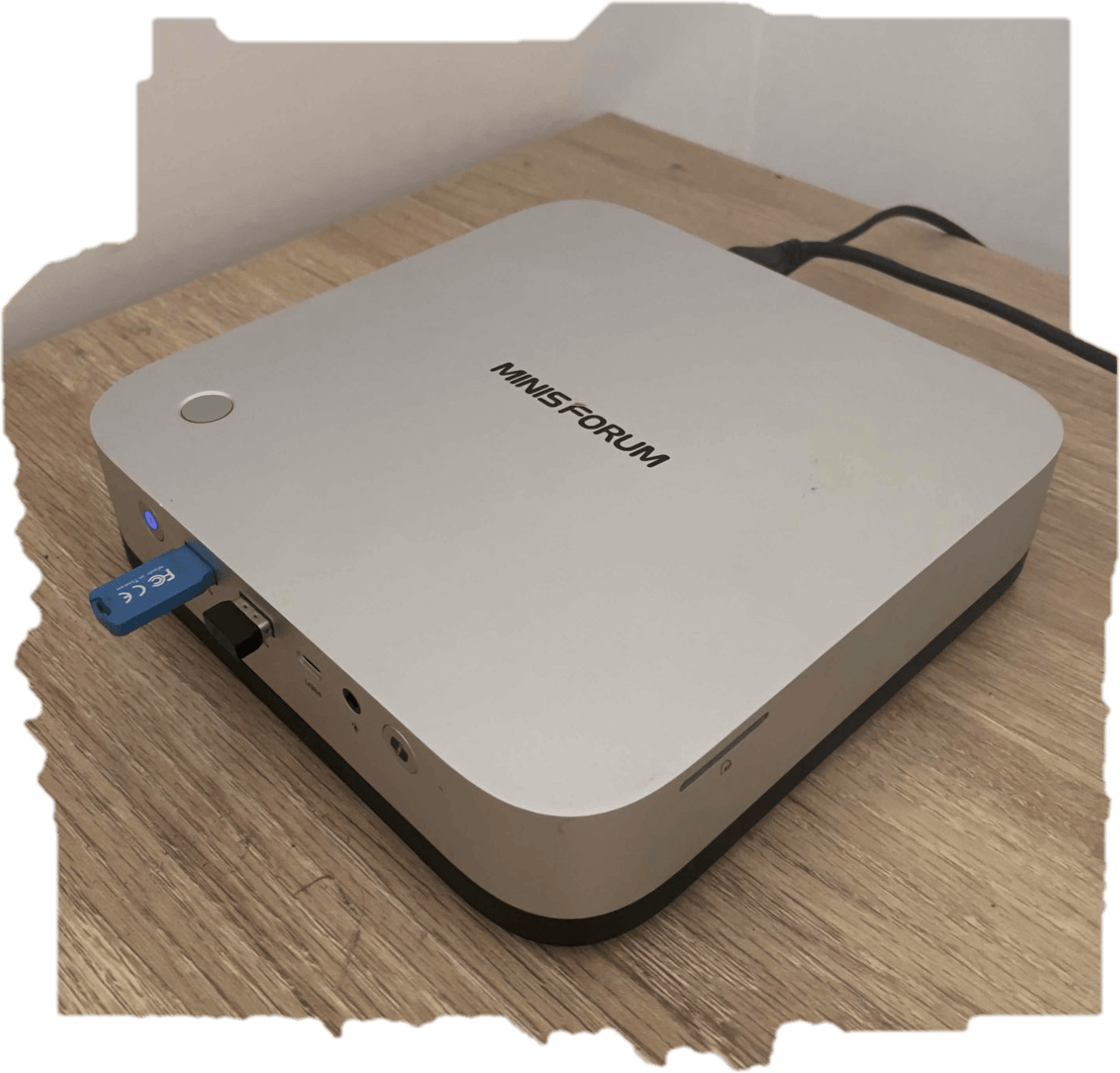 |
- Introduction
- System-Level Attributes
- Install PyTorch for ROCm
- MIGraphX for Radeon GPUs
- ONNX
- vLLM
- System Management Interface (SMI) for GPU
- Performance monitoring#
Introduction
AI X1 Pro-470 form factor1 is the Zen5 12-core architecture, the 86 TOPS NPU, and the Radeon 890M iGPU — all of which directly contextualise why the OEM kernel requirement and ROCm APU-specific setup described in the post are necessary.
I have installed the rocm as explained in the documentation2.
For ROCm on Ryzen, it is required to operate on the 6.14-1018 OEM kernel or newer.
I have installed:
uname -r
6.17.0-14-generic
The install guide requires --no-dkms when running amdgpu-install, because inbox drivers (drivers built directly into the kernel) are required for ROCm on Ryzen APUs3.
The oem kernel flavour is maintained by Canonical’s OEM team and contains AMD-specific patches, and driver backports that are not present in the mainline generic kernel. These include:
- iGPU/APU-specific KFD (Kernel Fusion Driver) patches for Ryzen compute workloads
- TTM shared memory management improvements AMD contributes to OEM kernels ahead of mainline
amdgpuinbox driver tuned for integrated graphics compute (gfx1100/gfx1151 series)
The generic kernel at 6.17 may not have these backports, even though it’s a newer base version.
Check if the GPU is listed as an agent:
rocminfo
ROCk module is loaded
=====================
HSA System Attributes
=====================
Runtime Version:         1.18
Runtime Ext Version:     1.15
System Timestamp Freq.:  1000.000000MHz
Sig. Max Wait Duration:  18446744073709551615 (0xFFFFFFFFFFFFFFFF) (timestamp count)
Machine Model:           LARGE
System Endianness:       LITTLE
Mwaitx:                  DISABLED
XNACK enabled:           NO
DMAbuf Support:          YES
VMM Support:             YES

==========
HSA Agents
==========
*******
Agent 1
*******
  Name:                    AMD Ryzen AI 9 HX 470 w/ Radeon 890M
  Uuid:                    CPU-XX
  Marketing Name:          AMD Ryzen AI 9 HX 470 w/ Radeon 890M
  Vendor Name:             CPU
  Feature:                 None specified
  Profile:                 FULL_PROFILE
  Float Round Mode:        NEAR
  Max Queue Number:        0(0x0)
  Queue Min Size:          0(0x0)
  Queue Max Size:          0(0x0)
  Queue Type:              MULTI
  Node:                    0
  Device Type:             CPU
  Cache Info:
    L1:                      49152(0xc000) KB
  Chip ID:                 0(0x0)
  ASIC Revision:           0(0x0)
  Cacheline Size:          64(0x40)
  Max Clock Freq. (MHz):   5297
  BDFID:                   0
  Internal Node ID:        0
  Compute Unit:            24
  SIMDs per CU:            0
  Shader Engines:          0
  Shader Arrs. per Eng.:   0
  WatchPts on Addr. Ranges:1
  Memory Properties:
  Features:                None
  Pool Info:
    Pool 1
      Segment:                 GLOBAL; FLAGS: FINE GRAINED
      Size:                    57217068(0x369102c) KB
      Allocatable:             TRUE
      Alloc Granule:           4KB
      Alloc Recommended Granule:4KB
      Alloc Alignment:         4KB
      Accessible by all:       TRUE
    Pool 2
      Segment:                 GLOBAL; FLAGS: EXTENDED FINE GRAINED
      Size:                    57217068(0x369102c) KB
      Allocatable:             TRUE
      Alloc Granule:           4KB
      Alloc Recommended Granule:4KB
      Alloc Alignment:         4KB
      Accessible by all:       TRUE
    Pool 3
      Segment:                 GLOBAL; FLAGS: KERNARG, FINE GRAINED
      Size:                    57217068(0x369102c) KB
      Allocatable:             TRUE
      Alloc Granule:           4KB
      Alloc Recommended Granule:4KB
      Alloc Alignment:         4KB
      Accessible by all:       TRUE
    Pool 4
      Segment:                 GLOBAL; FLAGS: COARSE GRAINED
      Size:                    57217068(0x369102c) KB
      Allocatable:             TRUE
      Alloc Granule:           4KB
      Alloc Recommended Granule:4KB
      Alloc Alignment:         4KB
      Accessible by all:       TRUE
  ISA Info:
*******
Agent 2
*******
  Name:                    gfx1150
  Uuid:                    GPU-XX
  Marketing Name:          AMD Radeon Graphics
  Vendor Name:             AMD
  Feature:                 KERNEL_DISPATCH
  Profile:                 BASE_PROFILE
  Float Round Mode:        NEAR
  Max Queue Number:        128(0x80)
  Queue Min Size:          64(0x40)
  Queue Max Size:          131072(0x20000)
  Queue Type:              MULTI
  Node:                    1
  Device Type:             GPU
  Cache Info:
    L1:                      32(0x20) KB
    L2:                      2048(0x800) KB
  Chip ID:                 5390(0x150e)
  ASIC Revision:           5(0x5)
  Cacheline Size:          128(0x80)
  Max Clock Freq. (MHz):   3100
  BDFID:                   50432
  Internal Node ID:        1
  Compute Unit:            16
  SIMDs per CU:            2
  Shader Engines:          1
  Shader Arrs. per Eng.:   2
  WatchPts on Addr. Ranges:4
  Coherent Host Access:    FALSE
  Memory Properties:       APU
  Features:                KERNEL_DISPATCH
  Fast F16 Operation:      TRUE
  Wavefront Size:          32(0x20)
  Workgroup Max Size:      1024(0x400)
  Workgroup Max Size per Dimension:
    x                        1024(0x400)
    y                        1024(0x400)
    z                        1024(0x400)
  Max Waves Per CU:        32(0x20)
  Max Work-item Per CU:    1024(0x400)
  Grid Max Size:           4294967295(0xffffffff)
  Grid Max Size per Dimension:
    x                        2147483647(0x7fffffff)
    y                        65535(0xffff)
    z                        65535(0xffff)
  Max fbarriers/Workgrp:   32
  Packet Processor uCode:: 31
  SDMA engine uCode::      14
  IOMMU Support::          None
  Pool Info:
    Pool 1
      Segment:                 GLOBAL; FLAGS: COARSE GRAINED
      Size:                    12582912(0xc00000) KB
      Allocatable:             TRUE
      Alloc Granule:           4KB
      Alloc Recommended Granule:2048KB
      Alloc Alignment:         4KB
      Accessible by all:       FALSE
    Pool 2
      Segment:                 GLOBAL; FLAGS: EXTENDED FINE GRAINED
      Size:                    12582912(0xc00000) KB
      Allocatable:             TRUE
      Alloc Granule:           4KB
      Alloc Recommended Granule:2048KB
      Alloc Alignment:         4KB
      Accessible by all:       FALSE
    Pool 3
      Segment:                 GROUP
      Size:                    64(0x40) KB
      Allocatable:             FALSE
      Alloc Granule:           0KB
      Alloc Recommended Granule:0KB
      Alloc Alignment:         0KB
      Accessible by all:       FALSE
  ISA Info:
    ISA 1
      Name:                    amdgcn-amd-amdhsa--gfx1150
      Machine Models:          HSA_MACHINE_MODEL_LARGE
      Profiles:                HSA_PROFILE_BASE
      Default Rounding Mode:   NEAR
      Default Rounding Mode:   NEAR
      Fast f16:                TRUE
      Workgroup Max Size:      1024(0x400)
      Workgroup Max Size per Dimension:
        x                        1024(0x400)
        y                        1024(0x400)
        z                        1024(0x400)
      Grid Max Size:           4294967295(0xffffffff)
      Grid Max Size per Dimension:
        x                        2147483647(0x7fffffff)
        y                        65535(0xffff)
        z                        65535(0xffff)
      FBarrier Max Size:       32
    ISA 2
      Name:                    amdgcn-amd-amdhsa--gfx11-generic
      Machine Models:          HSA_MACHINE_MODEL_LARGE
      Profiles:                HSA_PROFILE_BASE
      Default Rounding Mode:   NEAR
      Default Rounding Mode:   NEAR
      Fast f16:                TRUE
      Workgroup Max Size:      1024(0x400)
      Workgroup Max Size per Dimension:
        x                        1024(0x400)
        y                        1024(0x400)
        z                        1024(0x400)
      Grid Max Size:           4294967295(0xffffffff)
      Grid Max Size per Dimension:
        x                        2147483647(0x7fffffff)
        y                        65535(0xffff)
        z                        65535(0xffff)
      FBarrier Max Size:       32
*******
Agent 3
*******
  Name:                    aie2p
  Uuid:                    AIE-XX
  Marketing Name:          RyzenAI-npu4
  Vendor Name:             AMD
  Feature:                 AGENT_DISPATCH
  Profile:                 BASE_PROFILE
  Float Round Mode:        NEAR
  Max Queue Number:        1(0x1)
  Queue Min Size:          64(0x40)
  Queue Max Size:          64(0x40)
  Queue Type:              SINGLE
  Node:                    0
  Device Type:             DSP
  Cache Info:
    L2:                      2048(0x800) KB
  Chip ID:                 0(0x0)
  ASIC Revision:           0(0x0)
  Cacheline Size:          0(0x0)
  Max Clock Freq. (MHz):   0
  BDFID:                   0
  Internal Node ID:        0
  Compute Unit:            0
  SIMDs per CU:            0
  Shader Engines:          0
  Shader Arrs. per Eng.:   0
  WatchPts on Addr. Ranges:0
  Memory Properties:
  Features:                AGENT_DISPATCH
  Pool Info:
    Pool 1
      Segment:                 GLOBAL; FLAGS: KERNARG, COARSE GRAINED
      Size:                    57217068(0x369102c) KB
      Allocatable:             TRUE
      Alloc Granule:           4KB
      Alloc Recommended Granule:4KB
      Alloc Alignment:         4KB
      Accessible by all:       TRUE
    Pool 2
      Segment:                 GLOBAL; FLAGS: COARSE GRAINED
      Size:                    65536(0x10000) KB
      Allocatable:             TRUE
      Alloc Granule:           4KB
      Alloc Recommended Granule:0KB
      Alloc Alignment:         4KB
      Accessible by all:       TRUE
    Pool 3
      Segment:                 GLOBAL; FLAGS: COARSE GRAINED
      Size:                    57217068(0x369102c) KB
      Allocatable:             TRUE
      Alloc Granule:           4KB
      Alloc Recommended Granule:4KB
      Alloc Alignment:         4KB
      Accessible by all:       TRUE
  ISA Info:
*** Done ***
Your system has 3 HSA Agents detected — a CPU, a GPU, and an NPU. Here’s a breakdown:
System-Level Attributes
| Attribute | Value | Meaning |
|---|---|---|
| Runtime Version | 1.18 | ROCm HSA runtime installed and working |
| XNACK enabled | NO | Page fault retry for GPU memory is off (normal for APUs) |
| DMAbuf Support | YES | GPU can share buffers with other devices via Linux DMA-buf |
| VMM Support | YES | Virtual Memory Management is supported |
Agent 1 — CPU
AMD Ryzen AI 9 HX 470 w/ Radeon 890M
- 24 compute units, max clock 5297 MHz
- Has 4 memory pools totalling ~55.7 GB (your system RAM), all accessible by all agents — this is the unified memory characteristic of an APU
- Pool types cover Fine Grained, Extended Fine Grained, Kernarg, and Coarse Grained — used for different levels of CPU/GPU memory coherency
Agent 2 — GPU ✅ (The important one for ROCm)
AMD Radeon Graphics — gfx1150
This is your Radeon 890M iGPU. Key specs:
| Property | Value |
|---|---|
| ISA Target | amdgcn-amd-amdhsa--gfx1150 |
| Compute Units | 16 |
| SIMDs per CU | 2 |
| Max Clock | 3100 MHz |
| Wavefront Size | 32 |
| Max Workgroup Size | 1024 |
| Fast F16 | TRUE |
| Memory Pool | ~12 GB (shared from system RAM via TTM) |
Two important things to note:
- Memory Properties:
APU— confirms this is a unified memory APU, not a discrete GPU - Two ISAs are registered:
gfx1150(exact target) andgfx11-generic(fallback) — this means ROCm kernels compiled for the generic gfx11 family will also run on your chip - Accessible by all: FALSE on GPU pools — GPU VRAM pools are not directly CPU-accessible without explicit mapping (normal APU behaviour despite unified memory)
Agent 3 — NPU (Neural Processing Unit)
RyzenAI-npu4 (aie2p)
- This is the AMD XDNA NPU (AI Engine 2+) embedded in the Ryzen AI 9 HX 470
- Device type is
DSP, feature isAGENT_DISPATCH(notKERNEL_DISPATCHlike the GPU) - It uses system RAM pools but is not a general-purpose compute target for ROCm — it’s used via the separate ONNX/Vitis AI runtime path
- Max queue size is only 64 (single queue) — very different from the GPU’s 128 queues
ROCm utilises a shared system memory pool and is configured by default to half the system memory.
AMD recommends setting the minimum dedicated VRAM in the BIOS (0.5GB), and setting the TTM limit to a larger amount.
Using amd-ttm --set <NUM> set the shared memory. Current value is:
amd-ttm
💻 Current TTM pages limit: 3145728 pages (12.00 GB)
💻 Total system memory: 54.57 GB
You can clear the above settings by amd-ttm --clear.
I’ve updated the kernel to include Canonical drivers: sudo apt update && sudo apt install linux-oem-24.04c.
Verify the new oem version:
uname -r
6.17.0-1012-oem
Install PyTorch for ROCm
I used the Docker approach4 in his case,
cat > docker-compose.yaml << 'EOF'
services:
  rocm-pytorch:
    image: rocm/pytorch:rocm7.2_ubuntu24.04_py3.12_pytorch_release_2.9.1
    stdin_open: true
    tty: true
    cap_add:
      - SYS_PTRACE
    security_opt:
      - seccomp=unconfined
    devices:
      - /dev/kfd
      - /dev/dri
    group_add:
      - video
    ipc: host
    shm_size: 8g
EOF
The key mappings from docker run flags:
docker run flag |
docker-compose key |
|---|---|
-it |
stdin_open: true + tty: true |
--cap-add |
cap_add |
--security-opt |
security_opt |
--device |
devices |
--group-add |
group_add |
--ipc |
ipc |
--shm-size |
shm_size |
You can run PyTorch using docker compose run --rm rocm-pytorch.
Verify if Pytorch is installed and is detecting the GPU compute device:
docker run --rm \
  --cap-add=SYS_PTRACE \
  --security-opt seccomp=unconfined \
  --device=/dev/kfd \
  --device=/dev/dri \
  --group-add video \
  --ipc=host \
  --shm-size 8G \
  rocm/pytorch:rocm7.2_ubuntu24.04_py3.12_pytorch_release_2.9.1 \
  bash -c "python3 -c 'import torch' 2> /dev/null && echo 'Success' || echo 'Failure'"
Success
test if the GPU is available.
docker run --rm \
  --cap-add=SYS_PTRACE \
  --security-opt seccomp=unconfined \
  --device=/dev/kfd \
  --device=/dev/dri \
  --group-add video \
  --ipc=host \
  --shm-size 8G \
  rocm/pytorch:rocm7.2_ubuntu24.04_py3.12_pytorch_release_2.9.1 \
  bash -c "python3 -c 'import torch; print(torch.cuda.is_available())'"
True
display installed GPU device name:
docker run --rm \
  --cap-add=SYS_PTRACE \
  --security-opt seccomp=unconfined \
  --device=/dev/kfd \
  --device=/dev/dri \
  --group-add video \
  --ipc=host \
  --shm-size 8G \
  rocm/pytorch:rocm7.2_ubuntu24.04_py3.12_pytorch_release_2.9.1 \
  bash -c 'python3 -c "import torch; print(f\"device name [0]:\", torch.cuda.get_device_name(0))"'
device name [0]: AMD Radeon Graphics
display component information within the current PyTorch environment
docker run --rm \
  --cap-add=SYS_PTRACE \
  --security-opt seccomp=unconfined \
  --device=/dev/kfd \
  --device=/dev/dri \
  --group-add video \
  --ipc=host \
  --shm-size 8G \
  rocm/pytorch:rocm7.2_ubuntu24.04_py3.12_pytorch_release_2.9.1 \
  bash -c 'python3 -m torch.utils.collect_env'
<frozen runpy>:128: RuntimeWarning: 'torch.utils.collect_env' found in sys.modules after import of package 'torch.utils', but prior to execution of 'torch.utils.collect_env'; this may result in unpredictable behaviour
Collecting environment information...
PyTorch version: 2.9.1+rocm7.2.0.git7e1940d4
Is debug build: False
CUDA used to build PyTorch: N/A
ROCM used to build PyTorch: 7.2.26015-fc0010cf6a

OS: Ubuntu 24.04.3 LTS (x86_64)
GCC version: (Ubuntu 13.3.0-6ubuntu2~24.04) 13.3.0
Clang version: Could not collect
CMake version: Could not collect
Libc version: glibc-2.39

Python version: 3.12.3 (main, Jan  8 2026, 11:30:50) [GCC 13.3.0] (64-bit runtime)
Python platform: Linux-6.17.0-1012-oem-x86_64-with-glibc2.39
Is CUDA available: True
CUDA runtime version: Could not collect
CUDA_MODULE_LOADING set to:
GPU models and configuration: AMD Radeon Graphics (gfx1150)
Nvidia driver version: Could not collect
cuDNN version: Could not collect
Is XPU available: False
HIP runtime version: 7.2.26015
MIOpen runtime version: 3.5.1
Is XNNPACK available: True

CPU:
Architecture:                            x86_64
CPU op-mode(s):                          32-bit, 64-bit
Address sizes:                           48 bits physical, 48 bits virtual
Byte Order:                              Little Endian
CPU(s):                                  24
On-line CPU(s) list:                     0-23
Vendor ID:                               AuthenticAMD
Model name:                              AMD Ryzen AI 9 HX 470 w/ Radeon 890M
CPU family:                              26
Model:                                   36
Thread(s) per core:                      2
Core(s) per socket:                      12
Socket(s):                               1
Stepping:                                0
Frequency boost:                         enabled
CPU(s) scaling MHz:                      47%
CPU max MHz:                             5297.2979
CPU min MHz:                             621.6220
BogoMIPS:                                3992.31
Flags:                                   fpu vme de pse tsc msr pae mce cx8 apic sep mtrr pge mca cmov pat pse36 clflush mmx fxsr sse sse2 ht syscall nx mmxext fxsr_opt pdpe1gb rdtscp lm constant_tsc rep_good amd_lbr_v2 nopl xtopology nonstop_tsc cpuid extd_apicid aperfmperf rapl pni pclmulqdq monitor ssse3 fma cx16 sse4_1 sse4_2 movbe popcnt aes xsave avx f16c rdrand lahf_lm cmp_legacy svm extapic cr8_legacy abm sse4a misalignsse 3dnowprefetch osvw ibs skinit wdt tce topoext perfctr_core perfctr_nb bpext perfctr_llc mwaitx cpuid_fault cpb cat_l3 cdp_l3 hw_pstate ssbd mba perfmon_v2 ibrs ibpb stibp ibrs_enhanced vmmcall fsgsbase tsc_adjust bmi1 avx2 smep bmi2 erms invpcid cqm rdt_a avx512f avx512dq rdseed adx smap avx512ifma clflushopt clwb avx512cd sha_ni avx512bw avx512vl xsaveopt xsavec xgetbv1 xsaves cqm_llc cqm_occup_llc cqm_mbm_total cqm_mbm_local user_shstk avx_vnni avx512_bf16 clzero irperf xsaveerptr rdpru wbnoinvd cppc arat npt lbrv svm_lock nrip_save tsc_scale vmcb_clean flushbyasid decodeassists pausefilter pfthreshold avic v_vmsave_vmload vgif x2avic v_spec_ctrl vnmi avx512vbmi umip pku ospke avx512_vbmi2 gfni vaes vpclmulqdq avx512_vnni avx512_bitalg avx512_vpopcntdq rdpid bus_lock_detect movdiri movdir64b overflow_recov succor smca fsrm avx512_vp2intersect flush_l1d amd_lbr_pmc_freeze
Virtualization:                          AMD-V
L1d cache:                               576 KiB (12 instances)
L1i cache:                               384 KiB (12 instances)
L2 cache:                                12 MiB (12 instances)
L3 cache:                                24 MiB (2 instances)
NUMA node(s):                            1
NUMA node0 CPU(s):                       0-23
Vulnerability Gather data sampling:      Not affected
Vulnerability Ghostwrite:                Not affected
Vulnerability Indirect target selection: Not affected
Vulnerability Itlb multihit:             Not affected
Vulnerability L1tf:                      Not affected
Vulnerability Mds:                       Not affected
Vulnerability Meltdown:                  Not affected
Vulnerability Mmio stale data:           Not affected
Vulnerability Old microcode:             Not affected
Vulnerability Reg file data sampling:    Not affected
Vulnerability Retbleed:                  Not affected
Vulnerability Spec rstack overflow:      Mitigation; IBPB on VMEXIT only
Vulnerability Spec store bypass:         Mitigation; Speculative Store Bypass disabled via prctl
Vulnerability Spectre v1:                Mitigation; usercopy/swapgs barriers and __user pointer sanitization
Vulnerability Spectre v2:                Mitigation; Enhanced / Automatic IBRS; IBPB conditional; STIBP always-on; PBRSB-eIBRS Not affected; BHI Not affected
Vulnerability Srbds:                     Not affected
Vulnerability Tsa:                       Not affected
Vulnerability Tsx async abort:           Not affected
Vulnerability Vmscape:                   Mitigation; IBPB on VMEXIT

Versions of relevant libraries:
[pip3] numpy==2.4.1
[pip3] torch==2.9.1+rocm7.2.0.lw.git7e1940d4
[pip3] torchaudio==2.9.0+rocm7.2.0.gite3c6ee2b
[pip3] torchvision==0.24.0+rocm7.2.0.gitb919bd0c
[pip3] triton==3.5.1+rocm7.2.0.gita272dfa8
[conda] Could not collect
MIGraphX for Radeon GPUs
After ROCm installation (verified with PyTorch), the next step is to install MIGraphX, the graph inference engine that accelerates machine learning model inference and can be used to accelerate workloads within the Torch MIGraphX and ONNX Runtime backend frameworks.
sudo apt install migraphx
Verify the installation:
dpkg -l | grep migraphx
ii  migraphx                                      2.15.0.70200-43~24.04                    amd64        AMD graph optimizer
ii  migraphx-dev                                  2.15.0.70200-43~24.04                    amd64        AMD graph optimizer
dpkg -l | grep half
ii half 1.12.0.70200-43~24.04 amd64 HALF-PRECISION FLOATING POINT LIBRARY
Perform a simple inference with MIGraphX to verify the installation:
/opt/rocm-7.2.0/bin/migraphx-driver perf --test
Running [ MIGraphX Version: 2.15.0.20250912-17-195-g1afd1b89c ]: /opt/rocm-7.2.0/bin/migraphx-driver perf --test
[2026-03-08 11:26:14]
Compiling ...
module: "main"
@0 = check_context::migraphx::gpu::context -> float_type, {}, {}
main:#output_0 = @param:main:#output_0 -> float_type, {4, 3}, {3, 1}
b = @param:b -> float_type, {5, 3}, {3, 1}
a = @param:a -> float_type, {4, 5}, {5, 1}
@4 = gpu::code_object[code_object=4656,symbol_name=mlir_dot,global=256,local=256,output_arg=2,](a,b,main:#output_0) -> float_type, {4, 3}, {3, 1}


Allocating params ...
Running performance report ...
@0 = check_context::migraphx::gpu::context -> float_type, {}, {}: 0.00028068ms, 3%
main:#output_0 = @param:main:#output_0 -> float_type, {4, 3}, {3, 1}: 0.00022842ms, 3%
b = @param:b -> float_type, {5, 3}, {3, 1}: 0.0002194ms, 3%
a = @param:a -> float_type, {4, 5}, {5, 1}: 0.00021078ms, 3%
@4 = gpu::code_object[code_object=4656,symbol_name=mlir_dot,global=256,local=256,output_arg=2,](a,b,main:#output_0) -> float_type, {4, 3}, {3, 1}: 0.00880674ms, 91%

Summary:
gpu::code_object::mlir_dot: 0.00880674ms / 1 = 0.00880674ms, 91%
@param: 0.0006586ms / 3 = 0.000219533ms, 7%
check_context::migraphx::gpu::context: 0.00028068ms / 1 = 0.00028068ms, 3%

Batch size: 1
Rate: 83845.5 inferences/sec
Total time: 0.0119267ms (Min: 0.011309ms, Max: 0.022467ms, Mean: 0.0125111ms, Median: 0.0119195ms)
Percentiles (90%, 95%, 99%): (0.013382ms, 0.016197ms, 0.021636ms)
Total instructions time: 0.00974602ms
Overhead time: 0.00045574ms, 0.00218068ms
Overhead: 4%, 18%
[2026-03-08 11:26:15]
[ MIGraphX Version: 2.15.0.20250912-17-195-g1afd1b89c ] Complete(0.945651s): /opt/rocm-7.2.0/bin/migraphx-driver perf --test
ONNX
Open Neural Network Exchange (ONNX)5 is an open standard format for representing machine learning models, originally created by Microsoft and Meta in 2017 and now governed by the Linux Foundation. The Core Problem It Solves:
Every ML framework (PyTorch, TensorFlow, JAX, scikit-learn) has its own internal model format. Without ONNX, a model trained in PyTorch cannot be directly deployed in a TensorFlow serving environment. ONNX acts as a universal interchange format — train anywhere, deploy anywhere.
PyTorch ──┐
TensorFlow─┤──► ONNX model (.onnx) ──► Any runtime / hardware
JAX ───────┘
Key Concepts
- ONNX Model — a .onnx file that encodes the model’s computation graph (nodes, edges, operators) in a hardware-agnostic way using Google’s Protocol Buffers.
- ONNX Operators — a standardised set of operations (Conv, MatMul, ReLU, etc.) that all compliant frameworks must support.
- ONNX Runtime (ORT) — Microsoft’s high-performance inference engine for .onnx models. It is separate from the ONNX format itself and is what you install via pip install onnxruntime.
Execution Providers (EPs) — ORT’s plugin system for hardware acceleration. Rather than running on the CPU by default, EPs delegate computation to specific hardware:
| Execution Provider | Hardware |
|---|---|
CPUExecutionProvider |
Any CPU |
MIGraphXExecutionProvider |
AMD ROCm GPUs (via MIGraphX) |
ROCMExecutionProvider |
AMD ROCm GPUs (direct) |
CUDAExecutionProvider |
NVIDIA CUDA GPUs |
TensorrtExecutionProvider |
NVIDIA TensorRT |
CoreMLExecutionProvider |
Apple Silicon |
Typical workflow:
- Train model in PyTorch
- Export to ONNX
torch.onnx.export(model, dummy_input, "model.onnx")
- Run inference via ONNX Runtime
       sess = ort.InferenceSession("model.onnx",
                 providers=["MIGraphXExecutionProvider"])
       output = sess.run(None, {"input": data})
AMD Radeon 890M (
gfx1150), the MIGraphX EP compiles the ONNX graph using AMD’s MIGraphX graph optimiser at inference time, fusing operators and generating GPU-optimised kernels — giving you significantly better performance than the CPU fallback.
Here is the Dockerfile:
cat > Dockerfile << 'EOF'
FROM rocm/pytorch:rocm7.2_ubuntu24.04_py3.12_pytorch_release_2.9.1

# Install MIGraphX (prerequisite for ONNX Runtime MIGraphX EP)
RUN apt-get update && apt-get install -y \
    migraphx \
    migraphx-dev \
    half \
    && rm -rf /var/lib/apt/lists/*

# Downgrade numpy (v2.0 is incompatible with onnxruntime-migraphx wheels)
RUN pip3 install numpy==1.26.4

# Install ONNX Runtime with MIGraphX Execution Provider
RUN pip3 uninstall -y onnxruntime-migraphx || true && \
    pip3 install onnxruntime-migraphx -f https://repo.radeon.com/rocm/manylinux/rocm-rel-7.2/

WORKDIR /workspace
EOF
create a docker compose file to make things easier:
cat > docker-compose.yaml << 'EOF'
services:
  rocm-onnx:
    build: .
    image: rocm-onnx:rocm7.2
    cap_add:
      - SYS_PTRACE
    security_opt:
      - seccomp=unconfined
    devices:
      - /dev/kfd
      - /dev/dri
    group_add:
      - video
    ipc: host
    shm_size: 8g
    volumes:
      - ./workspace:/workspace
EOF
The volumes mount maps a local ./workspace directory into the container so you can drop .onnx model files there and run inference without rebuilding the image.
Build the Docker instance using the above files: docker compose build.
To verify:
docker compose run --rm rocm-onnx \
  python3 -c "import onnxruntime as ort; print(ort.get_available_providers())"
[?25l[0G[+] create 1/1
✔ Network blogs_default Created 0.0s
[?25h[?25l[2A[0G[+] 1/1
✔ Network blogs_default Created 0.0s
[?25hContainer blogs-rocm-onnx-run-315e1fcece42 Creating
Container blogs-rocm-onnx-run-315e1fcece42 Created
['MIGraphXExecutionProvider', 'CPUExecutionProvider']
Verify MIGraphX works:
docker compose run --rm rocm-onnx \
  /opt/rocm-7.2.0/bin/migraphx-driver perf --test
Container blogs-rocm-onnx-run-9472d6713026 Creating
Container blogs-rocm-onnx-run-9472d6713026 Created
Running [ MIGraphX Version: 2.15.0.20250912-17-195-g1afd1b89c ]: /opt/rocm-7.2.0/bin/migraphx-driver perf --test
[2026-03-08 00:36:46]
Compiling ...
module: "main"
@0 = check_context::migraphx::gpu::context -> float_type, {}, {}
main:#output_0 = @param:main:#output_0 -> float_type, {4, 3}, {3, 1}
b = @param:b -> float_type, {5, 3}, {3, 1}
a = @param:a -> float_type, {4, 5}, {5, 1}
@4 = gpu::code_object[code_object=4656,symbol_name=mlir_dot,global=256,local=256,output_arg=2,](a,b,main:#output_0) -> float_type, {4, 3}, {3, 1}


Allocating params ...
Running performance report ...
@0 = check_context::migraphx::gpu::context -> float_type, {}, {}: 0.00028054ms, 3%
main:#output_0 = @param:main:#output_0 -> float_type, {4, 3}, {3, 1}: 0.00022022ms, 3%
b = @param:b -> float_type, {5, 3}, {3, 1}: 0.0002111ms, 3%
a = @param:a -> float_type, {4, 5}, {5, 1}: 0.00020764ms, 3%
@4 = gpu::code_object[code_object=4656,symbol_name=mlir_dot,global=256,local=256,output_arg=2,](a,b,main:#output_0) -> float_type, {4, 3}, {3, 1}: 0.0089923ms, 91%

Summary:
gpu::code_object::mlir_dot: 0.0089923ms / 1 = 0.0089923ms, 91%
@param: 0.00063896ms / 3 = 0.000212987ms, 7%
check_context::migraphx::gpu::context: 0.00028054ms / 1 = 0.00028054ms, 3%

Batch size: 1
Rate: 99657.6 inferences/sec
Total time: 0.0100344ms (Min: 0.009097ms, Max: 0.03133ms, Mean: 0.0133908ms, Median: 0.009989ms)
Percentiles (90%, 95%, 99%): (0.025579ms, 0.026391ms, 0.029907ms)
Total instructions time: 0.0099118ms
Overhead time: 0.00045108ms, 0.00012256ms
Overhead: 4%, 1%
[2026-03-08 00:36:46]
[ MIGraphX Version: 2.15.0.20250912-17-195-g1afd1b89c ] Complete(0.666102s): /opt/rocm-7.2.0/bin/migraphx-driver perf --test
vLLM
Run the following Docker command to set up vLLM:
# 1. Stop and remove the existing container
docker stop vllm_rocm_container
docker rm vllm_rocm_container

# 2. (Optional) Pull latest base image
docker pull rocm/vllm-dev:rocm7.2_navi_ubuntu24.04_py3.12_pytorch_2.9_vllm_0.14.0rc0

# 3. Run fresh
docker run -it \
  --network=host \
  --group-add=video \
  --group-add=992 \
  --ipc=host \
  --cap-add=SYS_PTRACE \
  --security-opt seccomp=unconfined \
  --device /dev/kfd \
  --device /dev/dri \
  --shm-size 8g \
  -e HSA_OVERRIDE_GFX_VERSION=11.5.0 \
  -w /app/vllm/ \
  --name vllm_rocm_container \
  rocm/vllm-dev:rocm7.2_navi_ubuntu24.04_py3.12_pytorch_2.9_vllm_0.14.0rc0 \
  /bin/bash
In the Docker bash prompt, check the vLLM availability:
python -c "import vllm; print(vllm.__file__)"
Clone the Hugging Face GitHub repository within the Docker container.
apt update
apt install git-lfs
git lfs clone https://huggingface.co/TechxGenus/Meta-Llama-3-8B-Instruct-GPTQ
Run the benchmarks:
vllm bench latency --model /app/vllm/Meta-Llama-3-8B-Instruct-GPTQ -q gptq --batch-size 1 --input-len 1024 --output-len 1024 --max-model-len 8192
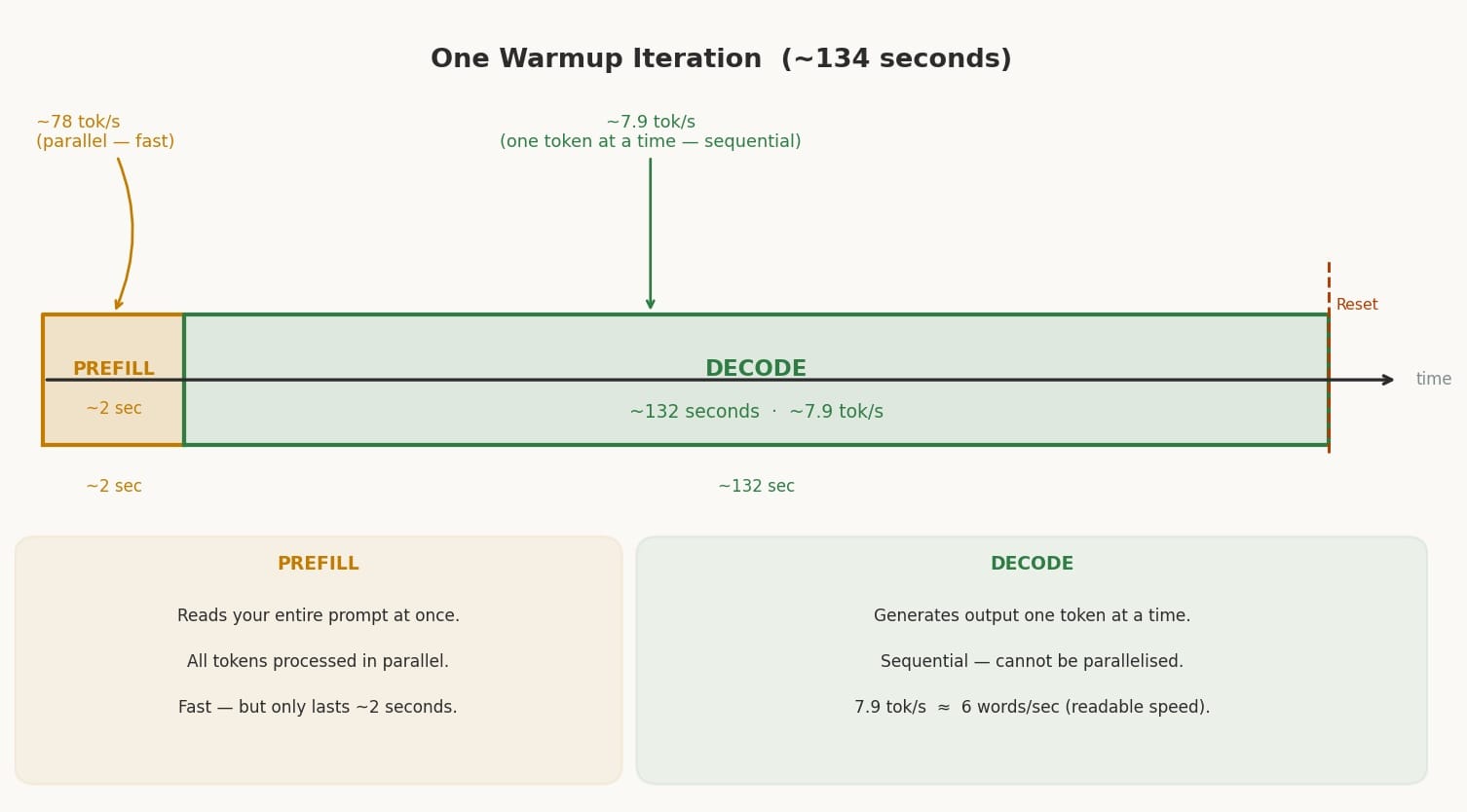
One iteration (134 seconds) — each warmup cycle has two distinct phases: a very short prefill burst (~2s) followed by a long decode phase (~132s). The bar at the bottom shows how lopsided the split is.
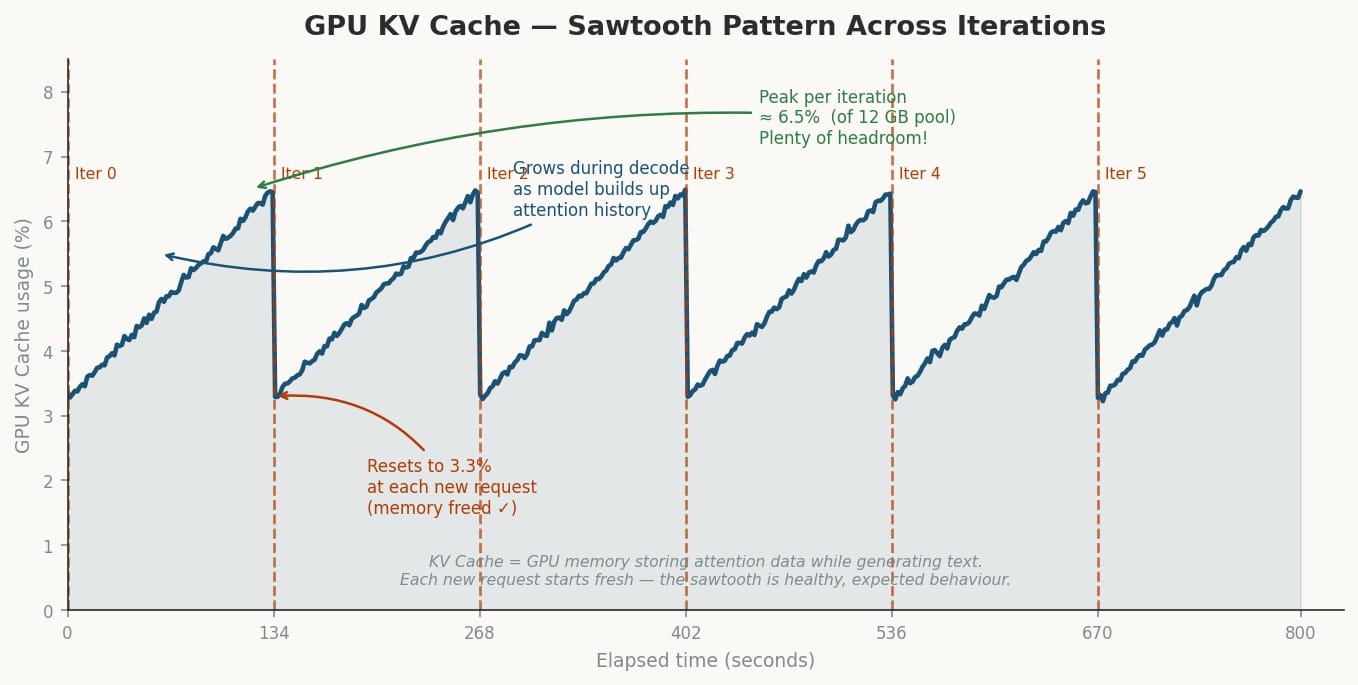
KV Cache sawtooth — the GPU memory grows steadily during decode as the model accumulates attention data, then snaps back to 3.3% at the start of each new prefill. This is healthy behaviour — it means memory is being freed correctly.
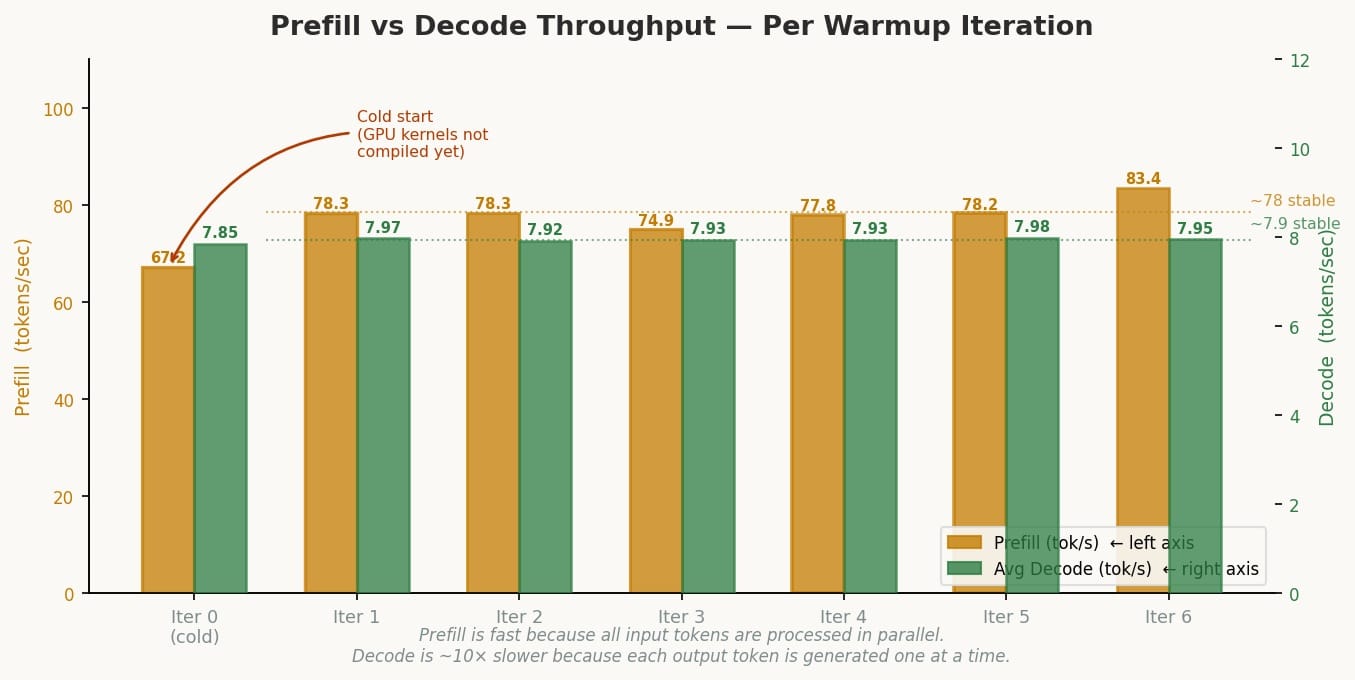
Prefill vs Decode per iteration — iteration 0 is noticeably slower on prefill (67 vs ~78 tok/s) because the GPU’s Triton/ROCm kernels haven’t been compiled yet (cold start). From iteration 1 onward it’s stable.
System Management Interface (SMI) for GPU
Performance optimisation and efficient resource monitoring are paramount. The AMD System Management Interface command-line tool, amd-smi6, addresses these needs with a primary focus on GPUs.Device information: Quickly retrieve detailed information about AMD GPUs. This tool supports real-time monitoring of GPU utilisation, memory, temperature, and power consumption. In addition, identify which processes are using GPUs and even adjust GPU settings such as clock speeds and power limits. Most importantly, monitor and report GPU errors for proactive maintenance. I am using the following version of amd-smi (latest to date):
amd-smi version
AMDSMI Tool: 26.2.1+fc0010cf6a | AMDSMI Library version: 26.2.1 | ROCm version: 7.2.0 | amdgpu version: Linuxversion6.17.0-1012-oem(buildd@lcy02-amd64-114)(x86_64-linux-gnu-gcc-13(Ubuntu13.3.0-6ubuntu2~24.04)13.3.0,GNUld(GNUBinutilsforUbuntu)2.42)#12-UbuntuSMPPREEMPT_DYNAMICTueFeb1004:51:46UTC2026 | hsmp version: N/A
To install
sudo apt install amd-smi-libon Ubuntu.
To list all the GPUs
amd-smi list
GPU: 0
    BDF: 0000:c5:00.0
    UUID: 00ff150e-0000-1000-8000-000000000000
    KFD_ID: 57812
    NODE_ID: 1
    PARTITION_ID: 0
Use the above information to set the
HIP_VISIBLE_DEVICES=nwhere n >= 0. As shown in the aboveGPU: 0, n = 0 for this system.
For more detailed information about your GPU:
amd-smi static
GPU: 0
    ASIC:
        MARKET_NAME: AMD Radeon Graphics
        VENDOR_ID: 0x1002
        VENDOR_NAME: Advanced Micro Devices Inc. [AMD/ATI]
        SUBVENDOR_ID: 0x1f4c
        DEVICE_ID: 0x150e
        SUBSYSTEM_ID: 0xb020
        REV_ID: 0xe4
        ASIC_SERIAL: 0x0000000000000000
        OAM_ID: N/A
        NUM_COMPUTE_UNITS: 16
        TARGET_GRAPHICS_VERSION: gfx1150
    BUS:
        BDF: 0000:c5:00.0
        MAX_PCIE_WIDTH: N/A
        MAX_PCIE_SPEED: N/A
        PCIE_LEVELS: N/A
        PCIE_INTERFACE_VERSION: N/A
        SLOT_TYPE: N/A
    IFWI:
        NAME: AMD STRIX_B0_GENERIC
        BUILD_DATE: 2025/08/14 10:14
        PART_NUMBER: 113-STRIXEMU-001
        VERSION: 023.010.002.001.000001
    LIMIT:
        PPT0:
            MAX_POWER_LIMIT: N/A
            MIN_POWER_LIMIT: N/A
            SOCKET_POWER_LIMIT: N/A
        PPT1:
            MAX_POWER_LIMIT: N/A
            MIN_POWER_LIMIT: N/A
            SOCKET_POWER_LIMIT: N/A
        SLOWDOWN_EDGE_TEMPERATURE: N/A
        SLOWDOWN_HOTSPOT_TEMPERATURE: N/A
        SLOWDOWN_VRAM_TEMPERATURE: N/A
        SHUTDOWN_EDGE_TEMPERATURE: N/A
        SHUTDOWN_HOTSPOT_TEMPERATURE: N/A
        SHUTDOWN_VRAM_TEMPERATURE: N/A
        PTL_STATE: N/A
        PTL_FORMAT: N/A
    DRIVER:
        NAME: amdgpu
        VERSION: Linuxversion6.17.0-1012-oem(buildd@lcy02-amd64-114)(x86_64-linux-gnu-gcc-13(Ubuntu13.3.0-6ubuntu2~24.04)13.3.0,GNUld(GNUBinutilsforUbuntu)2.42)#12-UbuntuSMPPREEMPT_DYNAMICTueFeb1004:51:46UTC2026
    BOARD:
        MODEL_NUMBER: N/A
        PRODUCT_SERIAL: N/A
        FRU_ID: N/A
        PRODUCT_NAME: N/A
        MANUFACTURER_NAME: Advanced Micro Devices, Inc. [AMD/ATI]
    RAS:
        EEPROM_VERSION: N/A
        BAD_PAGE_THRESHOLD: N/A
        BAD_PAGE_THRESHOLD_EXCEEDED: N/A
        PARITY_SCHEMA: N/A
        SINGLE_BIT_SCHEMA: N/A
        DOUBLE_BIT_SCHEMA: N/A
        POISON_SCHEMA: N/A
        ECC_BLOCK_STATE: N/A
    SOC_PSTATE: N/A
    XGMI_PLPD: N/A
    PROCESS_ISOLATION: Disabled
    NUMA:
        NODE: 0
        AFFINITY: NONE
        CPU_AFFINITY: N/A
        SOCKET_AFFINITY: N/A
    VRAM:
        TYPE: DDR5
        VENDOR: UNKNOWN
        SIZE: 65536 MB
        BIT_WIDTH: 128
        MAX_BANDWIDTH: N/A
    CACHE_INFO:
        CACHE_0:
            CACHE_PROPERTIES: DATA_CACHE, SIMD_CACHE
            CACHE_SIZE: 32 KB
            CACHE_LEVEL: 1
            MAX_NUM_CU_SHARED: 1
            NUM_CACHE_INSTANCE: 16
        CACHE_1:
            CACHE_PROPERTIES: INST_CACHE, SIMD_CACHE
            CACHE_SIZE: 32 KB
            CACHE_LEVEL: 1
            MAX_NUM_CU_SHARED: 2
            NUM_CACHE_INSTANCE: 8
        CACHE_2:
            CACHE_PROPERTIES: DATA_CACHE, SIMD_CACHE
            CACHE_SIZE: 16 KB
            CACHE_LEVEL: 1
            MAX_NUM_CU_SHARED: 2
            NUM_CACHE_INSTANCE: 8
        CACHE_3:
            CACHE_PROPERTIES: DATA_CACHE, SIMD_CACHE
            CACHE_SIZE: 256 KB
            CACHE_LEVEL: 1
            MAX_NUM_CU_SHARED: 8
            NUM_CACHE_INSTANCE: 2
        CACHE_4:
            CACHE_PROPERTIES: DATA_CACHE, SIMD_CACHE
            CACHE_SIZE: 2048 KB
            CACHE_LEVEL: 2
            MAX_NUM_CU_SHARED: 16
            NUM_CACHE_INSTANCE: 1
    CLOCK:
        SYS:
            CURRENT_LEVEL: 1
            CURRENT_FREQUENCY: 688MHz
            FREQUENCY_LEVELS:
                LEVEL 0: 600 MHz
                LEVEL 1: 688 MHz
                LEVEL 2: 3100 MHz
        MEM: N/A
        DF: N/A
        SOC: N/A
        DCEF: N/A
        VCLK0: N/A
        VCLK1: N/A
        DCLK0: N/A
        DCLK1: N/A
ASIC — The Silicon Identity
VENDOR_ID: 0x1002          ← AMD's PCI vendor ID (universal across all AMD GPUs)
DEVICE_ID: 0x150e          ← Unique ID for gfx1150 (Radeon 890M die)
REV_ID: 0xe4               ← Silicon stepping/revision
TARGET_GRAPHICS_VERSION: gfx1150
NUM_COMPUTE_UNITS: 16      ← Matches rocminfo Agent 2 exactly
ASIC_SERIAL: 0x000...000 is all zeros — typical for APUs since there is no discrete GPU die with a burned-in serial. The SUBVENDOR_ID: 0x1f4c is MINISFORUM’s PCI subvendor registration.
BUS — Why Everything Shows N/A
BDF: 0000:c5:00.0
MAX_PCIE_WIDTH: N/A
MAX_PCIE_SPEED: N/A
This is the most telling APU signature in the output. Your Radeon 890M is not on a PCIe bus — it’s on the same die as the CPU, connected via AMD’s internal fabric. amd-smi is designed primarily for discrete GPUs and reports N/A for all PCIe fields because there is no PCIe link to measure. The BDF (c5:00.0) is a virtual PCI address assigned by the kernel to make the iGPU addressable, not a real slot.
IFWI — Integrated Firmware Image
NAME: AMD STRIX_B0_GENERIC
BUILD_DATE: 2025/08/14 10:14
VERSION: 023.010.002.001.000001
STRIX is AMD’s internal codename for the Ryzen AI 300/HX series (your HX 470 belongs to this family). B0 is the silicon stepping of your specific die. This is the GPU’s microcode/firmware version — separate from your kernel driver and BIOS. The August 2025 build date indicates this is a relatively recent firmware shipped with your OEM kernel.
LIMIT — All N/A by Design
MAX_POWER_LIMIT: N/A
SLOWDOWN_HOTSPOT_TEMPERATURE: N/A
SHUTDOWN_EDGE_TEMPERATURE: N/A
All power and thermal limits report N/A because on an APU, power and thermal management is owned by the CPU/SoC subsystem, not the GPU driver independently. The entire chip’s TDP is managed together. There is no separate GPU power rail for amd-smi to read or cap.
DRIVER
NAME: amdgpu
VERSION: Linuxversion6.17.0-1012-oem...
This is your OEM kernel’s amdgpu driver — the reason the blog post specifically required the 6.17.0-1012-oem kernel. Stock Ubuntu kernels at the time of writing did not yet have gfx1150 support merged. The driver version string is dense because it embeds the full compiler and linker metadata.
VRAM — The Unified Memory Truth
TYPE: DDR5
SIZE: 65536 MB      ← 64 GB
BIT_WIDTH: 128
VENDOR: UNKNOWN
MAX_BANDWIDTH: N/A
This is the most important section for AI workloads. Key points:
| Field | Meaning |
|---|---|
SIZE: 65536 MB |
The full 64GB system RAM is visible as “VRAM” — classic APU unified memory |
TYPE: DDR5 |
Your system RAM type, not GDDR |
BIT_WIDTH: 128 |
DDR5 runs in dual-channel on this platform (2×64-bit = 128-bit bus) |
VENDOR: UNKNOWN |
APU doesn’t have a discrete VRAM chip with an identifiable vendor |
MAX_BANDWIDTH: N/A |
Not reported, but DDR5-5600 dual-channel gives roughly ~89 GB/s theoretical |
This contrasts sharply with a discrete GPU like an RX 7900 XTX which would show TYPE: HBM3, SIZE: 24576 MB, MAX_BANDWIDTH: 960 GB/s. Your bottleneck for large model inference is this DDR5 bandwidth ceiling.
CACHE — The GPU Cache Hierarchy
CACHE_0: 32 KB L1, DATA+SIMD, shared by 1 CU,  ×16 instances  ← per-CU L1 data cache
CACHE_1: 32 KB L1, INST+SIMD, shared by 2 CUs, ×8  instances  ← instruction cache
CACHE_2: 16 KB L1, DATA+SIMD, shared by 2 CUs, ×8  instances  ← scalar data cache
CACHE_3: 256 KB L1, DATA+SIMD, shared by 8 CUs, ×2 instances  ← shader array L1
CACHE_4: 2048 KB L2, DATA+SIMD, shared by 16 CUs,×1 instance  ← unified L2 (whole GPU)
The structure reveals your GPU’s internal layout:
- 16 CUs total, arranged in 2 shader arrays of 8 CUs each (matches
Shader Arrs. per Eng.: 2in rocminfo) - A single 2MB L2 shared across all 16 CUs is the last cache level before hitting DDR5
- For inference, tensors that don’t fit in L2 go straight to system RAM across the 128-bit DDR5 bus
CLOCK — Idle Power State
SYS CURRENT_LEVEL: 1       ← sitting at idle level
CURRENT_FREQUENCY: 688 MHz ← idle/low-power clock
LEVEL 2: 3100 MHz          ← max boost (matches rocminfo Max Clock Freq.)
MEM: N/A                   ← memory clock not separately controllable on APU
The GPU is not under load at time of capture (nothing running, as confirmed by amd-smi showing no processes). Under vLLM inference you’d expect it to boost to or near 3100 MHz. All memory-related clocks (MEM, DF, SOC) report N/A because on an APU the memory subsystem is governed by the CPU/SoC fabric controller, not the GPU independently.
NUMA, RAS, SOC_PSTATE — All N/A
NUMA NODE: 0
NUMA AFFINITY: NONE
RAS: all N/A
SOC_PSTATE: N/A
NUMA shows node 0 with no CPU affinity — the APU and CPU share one NUMA domain (unified memory, single socket). RAS (Reliability, Availability, Serviceability — ECC error tracking) is N/A because ECC on consumer DDR5 APUs is not enabled. SOC_PSTATE controls the SoC’s performance state profile but is not exposed for this APU configuration through amd-smi.
Use amd-smi metric to view real-time metrics such as GPU utilisation, temperature, power consumption, and memory usage.
amd-smi metric
GPU: 0
    USAGE: N/A
    POWER:
        SOCKET_POWER: N/A
        GFX_VOLTAGE: N/A
        SOC_VOLTAGE: N/A
        MEM_VOLTAGE: N/A
        THROTTLE_STATUS: N/A
        POWER_MANAGEMENT: N/A
    CLOCK: N/A
    TEMPERATURE:
        EDGE: 28 °C
        HOTSPOT: N/A
        MEM: N/A
    PCIE:
        WIDTH: N/A
        SPEED: N/A
        BANDWIDTH: N/A
        REPLAY_COUNT: N/A
        L0_TO_RECOVERY_COUNT: N/A
        REPLAY_ROLL_OVER_COUNT: N/A
        NAK_SENT_COUNT: N/A
        NAK_RECEIVED_COUNT: N/A
        CURRENT_BANDWIDTH_SENT: N/A
        CURRENT_BANDWIDTH_RECEIVED: N/A
        MAX_PACKET_SIZE: N/A
        LC_PERF_OTHER_END_RECOVERY: N/A
    ECC:
        TOTAL_CORRECTABLE_COUNT: 0
        TOTAL_UNCORRECTABLE_COUNT: 0
        TOTAL_DEFERRED_COUNT: 0
        CACHE_CORRECTABLE_COUNT: N/A
        CACHE_UNCORRECTABLE_COUNT: N/A
    ECC_BLOCKS: N/A
    FAN:
        SPEED: N/A
        MAX: N/A
        RPM: N/A
        USAGE: N/A
    VOLTAGE_CURVE:
        POINT_0_FREQUENCY: N/A
        POINT_0_VOLTAGE: N/A
        POINT_1_FREQUENCY: N/A
        POINT_1_VOLTAGE: N/A
        POINT_2_FREQUENCY: N/A
        POINT_2_VOLTAGE: N/A
    OVERDRIVE: N/A
    MEM_OVERDRIVE: N/A
    PERF_LEVEL: AMDSMI_DEV_PERF_LEVEL_AUTO
    XGMI_ERR: N/A
    VOLTAGE:
        VDDBOARD: N/A
    ENERGY: N/A
    MEM_USAGE:
        TOTAL_VRAM: 65536 MB
        USED_VRAM: 1512 MB
        FREE_VRAM: 64024 MB
        TOTAL_VISIBLE_VRAM: 65536 MB
        USED_VISIBLE_VRAM: 1512 MB
        FREE_VISIBLE_VRAM: 64024 MB
        TOTAL_GTT: 12288 MB
        USED_GTT: 129 MB
        FREE_GTT: 12159 MB
    THROTTLE:
        ACCUMULATION_COUNTER: N/A
        PROCHOT_ACCUMULATED: N/A
        PPT_ACCUMULATED: N/A
        SOCKET_THERMAL_ACCUMULATED: N/A
        VR_THERMAL_ACCUMULATED: N/A
        HBM_THERMAL_ACCUMULATED: N/A
        GFX_CLK_BELOW_HOST_LIMIT_ACCUMULATED: N/A
        GFX_CLK_BELOW_HOST_LIMIT_POWER_ACCUMULATED: N/A
        GFX_CLK_BELOW_HOST_LIMIT_THERMAL_ACCUMULATED: N/A
        TOTAL_GFX_CLK_BELOW_HOST_LIMIT_ACCUMULATED: N/A
        LOW_UTILIZATION_ACCUMULATED: N/A
        PROCHOT_VIOLATION_STATUS: N/A
        PPT_VIOLATION_STATUS: N/A
        SOCKET_THERMAL_VIOLATION_STATUS: N/A
        VR_THERMAL_VIOLATION_STATUS: N/A
        HBM_THERMAL_VIOLATION_STATUS: N/A
        GFX_CLK_BELOW_HOST_LIMIT_VIOLATION_STATUS: N/A
        GFX_CLK_BELOW_HOST_LIMIT_POWER_VIOLATION_STATUS: N/A
        GFX_CLK_BELOW_HOST_LIMIT_THERMAL_VIOLATION_STATUS: N/A
        TOTAL_GFX_CLK_BELOW_HOST_LIMIT_VIOLATION_STATUS: N/A
        LOW_UTILIZATION_VIOLATION_STATUS: N/A
        PROCHOT_VIOLATION_ACTIVITY: N/A
        PPT_VIOLATION_ACTIVITY: N/A
        SOCKET_THERMAL_VIOLATION_ACTIVITY: N/A
        VR_THERMAL_VIOLATION_ACTIVITY: N/A
        HBM_THERMAL_VIOLATION_ACTIVITY: N/A
        GFX_CLK_BELOW_HOST_LIMIT_VIOLATION_ACTIVITY: N/A
        GFX_CLK_BELOW_HOST_LIMIT_POWER_VIOLATION_ACTIVITY: N/A
        GFX_CLK_BELOW_HOST_LIMIT_THERMAL_VIOLATION_ACTIVITY: N/A
        TOTAL_GFX_CLK_BELOW_HOST_LIMIT_VIOLATION_ACTIVITY: N/A
        LOW_UTILIZATION_VIOLATION_ACTIVITY: N/A
The pattern here is identical to amd-smi statistics — the tool is designed for discrete GPUs, and this APU silently returns N/A for every metric that belongs to the SoC power/thermal subsystem rather than an isolated GPU chip. EDGE: 28°C is this iGPU’s die edge temperature at idle — perfectly cool. This is the only sensor amd-smi that can be reached on the APU.
Two memory pools are reported. VRAM here is the full unified system RAM pool visible to the GPU — confirming ~62.5 GB is free and available before you launch vLLM. The GTT (Graphics Translation Table) pool is a separate kernel-managed aperture — a region of system RAM that the GPU driver pins for DMA-accessible, GPU-coherent use. It sits at 12 GB (roughly 1/5 of total RAM, which is the typical Linux kernel default). GTT is used for command buffers, shader binaries, and small kernel objects rather than model weights. For vLLM, the model weights go into VRAM; GTT handles the plumbing.
TOTAL_VRAM:         65536 MB   (64 GB system RAM)
USED_VRAM:           1512 MB   ← OS + desktop compositor overhead
FREE_VRAM:          64024 MB   ← available for model loading

TOTAL_GTT:          12288 MB   (12 GB)
USED_GTT:             129 MB
FREE_GTT:           12159 MB
Practical baseline: Before launching any model, your memory state is:
- 1,512 MB consumed (desktop + driver)
- 64,024 MB free for inference
A BF16 Llama 3.1 8B load will consume roughly 16 GB, bringing
USED_VRAMto ~17.5 GB — well within budget.
PERF_LEVEL
PERF_LEVEL: AMDSMI_DEV_PERF_LEVEL_AUTO
The GPU is in automatic performance scaling mode — the driver will boost from 688 MHz (the current idle clock, as seen in statistics) up to 3100 MHz as compute demand increases. You would not want to change this for inference workloads.
Performance monitoring#
The amd-smi monitor command displays utilisation metrics for GPUs, memory, power, PCIe bandwidth, and more. By default, amd-smi monitor outputs 18 metrics for every GPU. Passing in specific arguments limits the types of metrics displayed.
\-p, --power-usage            Monitor power usage in Watts
-t, --temperature            Monitor temperature in Celsius
-u, --gfx                    Monitor graphics utilization (%) and clock (MHz)
-m, --mem                    Monitor memory utilization (%) and clock (MHz)
-n, --encoder                Monitor encoder utilization (%) and clock (MHz)
-d, --decoder                Monitor decoder utilization (%) and clock (MHz)
-s, --throttle-status        Monitor thermal throttle status
-e, --ecc                    Monitor ECC single bit, ECC double bit, and PCIe replay error counts
-v, --vram-usage             Monitor memory usage in MB
-r, --pcie                   Monitor PCIe bandwidth in Mb/s
For example, to monitor power usage, GPU utilisation, temperature, and memory utilisation:
amd-smi monitor -putm
GPU  XCP  POWER  PWR_CAP   GPU_T   MEM_T   GFX_CLK   GFX%   MEM%  MEM_CLOCK
  0    0    N/A      N/A     N/A     N/A       N/A    N/A    N/A        N/A
The amd-smi process command shows details about processes running on the GPU, including their PIDs, memory usage, and GPU utilization.
amd-smi process
GPU: 0
    PROCESS_INFO: No running processes detected
To find the firmware information about your GPU:
amd-smi firmware
GPU: 0
    FW_LIST:
        FW 0:
            FW_ID: CP_PFP
            FW_VERSION: 44
        FW 1:
            FW_ID: CP_ME
            FW_VERSION: 31
        FW 2:
            FW_ID: CP_MEC1
            FW_VERSION: 31
        FW 3:
            FW_ID: RLC
            FW_VERSION: 290522434
        FW 4:
            FW_ID: SDMA0
            FW_VERSION: 14
        FW 5:
            FW_ID: VCN
            FW_VERSION: 09.11.80.0D
        FW 6:
            FW_ID: ASD
            FW_VERSION: 553648378
        FW 7:
            FW_ID: PM
            FW_VERSION: 12.93.02.00